

The 4K NDI PTZ Camera with AI voice tracking makes hands-free video production easier for modern teams.
A speaker moves across a room, a pastor walks across a stage, or a teacher turns toward a whiteboard. A fixed webcam may lose the subject at once. A PTZ camera can solve that problem with pan, tilt, zoom, and smart tracking. The 4K NDI PTZ Camera AI Voice Tracking NDI HX2 12x Optical Zoom stands out because it combines voice tracking, four microphones, gesture control, auto framing, and several video outputs. I compared it with four strong alternatives for churches, classrooms, meetings, and live streams.
See the differences between my top picks at a glance.
4K NDI PTZ Camera with Voice Tracking

The first camera is built for people who want a simple way to follow a speaker without a camera operator. It combines 4K video with a 12x optical zoom. Optical zoom matters because it enlarges a subject through the lens instead of cutting into the image. The supplied specifications also list NDI HX2, HDMI, LAN, and USB connections.
Its tracking system adds voice control, four microphones, gesture control, and auto framing. That mix gives it a clear focus on meetings, classrooms, worship services, and small studios. A voice-based system can help when the main speaker moves or when more than one person appears in the room. Still, users should test microphone pickup and tracking behavior in their own room before a major event.
The four-microphone design is one of this model’s most interesting features. It may help the camera locate a speaker by sound, while face or body detection can help keep the frame useful. The camera also works as a 4K webcam through USB, which may simplify a computer-based meeting setup. NDI can also reduce cable clutter when the network has enough capacity and proper configuration.
A 12x lens suits many medium rooms. It offers more reach than a basic webcam, but it does not match the distant framing range of a 20x model. I see this camera as a balanced choice for a room where the subject stays at a moderate distance. It is less attractive for a very deep auditorium or a large stage that needs tight shots from the back.
Pros:
- 4K output for clear meeting and streaming images
- Voice tracking can reduce the need for manual camera control
- Four built-in microphones support voice-based operation
- 12x optical zoom suits many medium-size rooms
- NDI HX2 supports network video workflows
- HDMI, LAN, and USB add setup flexibility
- Gesture control and auto framing can help solo operators
Cons:
- 12x zoom may not reach across a large auditorium
- AI tracking can need testing and adjustment in busy rooms
- NDI setup may feel complex for first-time users
- Buyers should confirm their exact software and network compatibility
What Amazon Buyers Are Saying
Before buying, I recommend reading the latest verified Amazon reviews for this exact listing. Customer experience can change with firmware, room layout, and the software used with the camera. Buyers often focus on setup ease, image clarity, tracking accuracy, and whether the camera works well with their streaming platform. The most useful reviews usually explain the room size, connection method, and lighting conditions.
Pay close attention to comments about voice pickup, USB operation, NDI discovery, and remote control. A good review should separate the camera’s hardware from network or software problems. I would also check recent reviews for reports about autofocus, fan noise, preset control, and long event use rather than relying only on the product title.
My Recommendation
I recommend this model for a church, classroom, meeting room, or small production team that values hands-free control. The 4K NDI PTZ Camera AI Voice Tracking NDI HX2 12x Optical Zoom offers a strong feature mix without depending on a separate camera operator. It is not my first choice for a very large venue that needs extreme zoom. For most medium-room installations, it is a practical and flexible option.
FoMaKo 4K PTZ Camera with 20x Zoom

FoMaKo’s K20UH takes a different approach from the first camera. It keeps 4K video but adds a 20x optical zoom. That longer lens can help when the camera sits far from a stage, lectern, or presentation area. The listing also identifies it as a third-generation AI auto-tracking camera with NDI HX3 certification.
The included NDI license is an important point for buyers who want a network production system. NDI HX3 can be useful in a compatible workflow, but the real benefit depends on the network, switch, computer, and software. The camera also lists USB 3.0, LAN, and HDMI outputs. Those ports make it easier to connect the camera to a computer, hardware switcher, or display system.
The 20x lens gives this model a clear advantage over 12x cameras when the subject stays far away. More zoom can also help create a tighter shot without placing the camera near the audience. However, a long lens needs a steady mount and careful preset planning. Small movements look more noticeable at high zoom, so installation quality matters.
I would consider this camera for worship spaces, lecture halls, and conference rooms that need useful detail from the rear of the room. The product listing says it supports AI auto-tracking, but buyers should test how it handles people crossing the frame. Auto tracking works best when the target has clear separation from the background and consistent light.
Pros:
- 20x optical zoom offers strong reach for large rooms
- 4K output supports detailed video production
- NDI HX3 certification suits compatible network workflows
- NDI license inclusion can reduce extra purchasing steps
- USB 3.0, LAN, and HDMI support varied connections
- AI auto-tracking can help a small production crew
- Good fit for stages, lecterns, and distant presenters
Cons:
- Long zoom can reveal small mounting or vibration issues
- Advanced NDI systems may require technical setup
- AI tracking performance can vary with lighting and crowd movement
- A 20x lens may cost more than a basic medium-room camera
What Amazon Buyers Are Saying
For this FoMaKo model, I would use recent Amazon reviews to verify the setup experience with your chosen NDI software. The key review themes to look for include image quality, zoom control, autofocus, AI tracking, and the included license process. Reviews that mention church stages or classrooms will offer more useful insight than short comments with no room details.
Also check whether buyers describe the camera as easy to control through their preferred method. Some users may use a remote, while others may rely on a controller or software panel. Look for reports about HDMI and USB output at the same time, network discovery, preset recall, and long-session reliability. These details matter more than a simple claim that the camera is “good.”
My Recommendation
FoMaKo is my stronger pick when zoom range matters most. Its 20x lens and NDI HX3 support make it well suited to a serious church or conference installation. I would choose it over the 12x voice-tracking model for a deep room. I would choose the first model instead when voice control and four microphones matter more than maximum reach.
Tenveo 4K NDI PTZ Camera

Tenveo offers another 4K PTZ option for people who need long-range framing and several professional outputs. Its listing names a 20x zoom, AI humanoid and face auto-tracking, 3G-SDI, HDMI, USB 3.0, and LAN with PoE. This combination targets live production rather than simple video calls. The white finish may also suit bright rooms and clean studio spaces.
The 3G-SDI output gives this camera a useful place in broadcast-style systems. SDI can run over longer cable paths than many common consumer connections when the installation uses the right cable and equipment. LAN and PoE may simplify power and signal planning, but buyers must confirm the network hardware supports the needed power standard. The tally light and IP display add useful information during a live show.
Humanoid tracking can help when the camera sees a person from a wider angle. Face tracking can help maintain a closer shot when the face remains visible. These modes are not identical, so users should select the mode that fits the room. A person who turns away, walks behind another person, or stands in poor light may still challenge any AI tracking system.
Tenveo makes sense for a church, event team, or live production group that already understands SDI and network video. It may be more camera than a small meeting room needs. The 20x zoom gives it room to grow, while PoE can make a permanent installation neater. I would test all outputs before the first live event and save reliable presets for common shots.
Pros:
- 20x optical zoom works well for distant subjects
- AI humanoid and face tracking offer two useful tracking approaches
- 3G-SDI suits longer professional cable runs
- HDMI, USB 3.0, LAN, and PoE add system flexibility
- Tally light can help a crew see camera status
- IP display may improve on-site monitoring
- Useful for church events and live video production
Cons:
- Its professional connections may overwhelm casual users
- PoE requires compatible network equipment
- Tracking can struggle when faces disappear or people overlap
- The white body may not suit every stage or studio
What Amazon Buyers Are Saying
When reviewing this Tenveo listing, I would focus on customer comments about SDI stability, PoE operation, and tracking during real events. Those points tell more than a general image-quality comment. Look for reviews that name the switcher, capture device, or streaming computer used. That context helps you judge whether the same setup will work in your system.
Buyers should also scan for practical notes about mounting, remote control, autofocus, and preset movement. Event users may mention long sessions, stage lighting, or fast presenter movement. Since this model offers many outputs, check reviews for the exact output you plan to use. A camera can perform well over HDMI while your separate SDI converter creates the problem.
My Recommendation
I recommend Tenveo for users who need SDI, PoE, and a 20x lens in one camera. It is a strong production choice, but it may be excessive for a basic webcam setup. Buyers should understand their signal chain before ordering. For a growing church or event team, the extra connections can justify the investment.
4K 60FPS AI PTZ Camera with 20x Zoom

This camera aims at buyers who care about smooth motion as much as detail. The listing highlights 4K at 60 frames per second, AI auto-tracking, and a 20x optical zoom. It also lists a 1/1.8-inch UHD CMOS sensor with 8.42 megapixels. Those specifications point toward a more advanced image system for live events, worship, and conference production.
60 frames per second can make camera movement and fast presenter motion look smoother than lower frame rates. It also gives editors more flexibility when they work with motion. However, 4K60 needs more storage, processing power, and network bandwidth than lower frame rates. Your switcher, capture device, computer, and streaming service must all support the chosen format.
The camera includes USB, 3G-SDI, HDMI, LAN, and PoE outputs according to the supplied listing. That makes it a flexible choice for both new and existing systems. The 1/1.8-inch sensor may help the camera gather more light than a very small webcam sensor, but lighting still matters. A well-lit subject will give better color, focus, and tracking results.
I like this option for users who want a camera that can support smooth live production today and more advanced workflows later. The 20x zoom helps with large spaces. The main trade-off is system demand: high frame rates and 4K signals can expose weak cables, overloaded computers, or limited network equipment. Plan the full signal path before selecting 4K60 as your main format.
Pros:
- 4K at 60 frames per second supports smooth motion
- 20x optical zoom suits large rooms and stages
- 1/1.8-inch UHD CMOS sensor is a strong listed specification
- 8.42MP sensor supports detailed UHD capture
- USB, SDI, HDMI, LAN, and PoE support many systems
- AI auto-tracking can reduce manual camera work
- Good fit for worship and live event production
Cons:
- 4K60 needs more bandwidth and processing power
- Users must confirm that all connected devices support 4K60
- PoE and SDI systems can raise installation complexity
- AI tracking still depends on light, contrast, and room movement
What Amazon Buyers Are Saying
For this newer-style 4K60 camera, I would check current Amazon reviews for real-world reports on frame rate, low-light quality, autofocus, and tracking. Buyers should confirm that their reviews refer to the same model and firmware. A product page can change over time, so the latest comments matter most.
Look for details about whether users received a stable 4K60 signal through their selected output. It also helps to find comments about PoE use and long recording sessions. If buyers report excellent results, check the lighting and hardware they used. If they report trouble, see whether the issue came from the camera or from a cable, switcher, capture card, or computer.
My Recommendation
This is my top pick for buyers who value smooth 4K60 motion and need 20x reach. It offers a broad connection set and a strong sensor specification. I would not buy it only for a basic Zoom call. It becomes more worthwhile when the production system can handle 4K60 and the room needs a long lens.
AVKANS 4K AI Tracking PTZ Camera
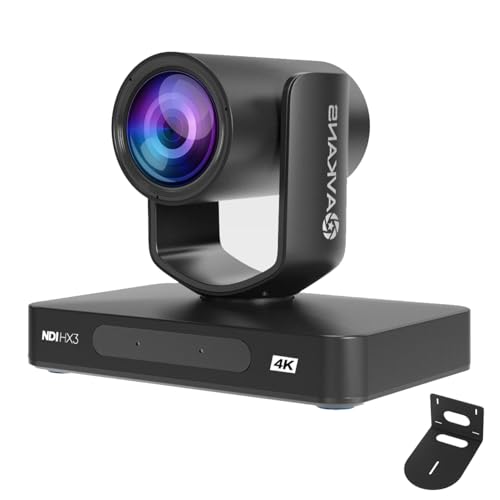
AVKANS provides a more focused setup for church worship and live events. The listing names 4K video, AI tracking, NDI, HDMI, SDI, and a 12x zoom. That combination can fit teams that already use SDI or HDMI but want to add network video. The black body should blend into many stage and production settings.
The 12x zoom works best in small and medium rooms. It can frame a speaker or worship leader without needing the camera close to the stage. The lens will not provide the same distant reach as the 20x models in this guide. Still, a shorter zoom can be easier to manage when the camera sits near the audience.
AVKANS may appeal to churches that want AI tracking without moving into a more complex multi-output camera system. HDMI and SDI give the operator familiar wired choices, while NDI can support a network-based workflow. Buyers should verify the exact NDI mode, software support, and network needs before installation. They should also test tracking with singers, musicians, and people moving across the stage.
I see this camera as a sensible value-oriented option for a team that needs the basics done well. It does not offer the voice and microphone features of the first model. It also lacks the listed 20x reach of the FoMaKo, Tenveo, and 4K60 models. Its appeal comes from a clear balance of 4K, AI tracking, NDI, HDMI, and SDI.
Pros:
- 4K video supports clear worship and event images
- AI tracking can follow a presenter or performer
- NDI, HDMI, and SDI support varied installations
- 12x zoom fits many small and medium venues
- Black finish can blend into stage environments
- Useful option for teams upgrading from a basic webcam
- Church-focused design makes its intended use clear
Cons:
- 12x zoom offers less reach than the 20x alternatives
- It does not list the voice tracking and four microphones found on the first camera
- Buyers should confirm the exact NDI workflow before purchase
- AI tracking may need a clear subject and good stage lighting
What Amazon Buyers Are Saying
For AVKANS, I would read Amazon feedback about church use, SDI output, HDMI capture, and AI tracking. Reviews from worship teams can reveal how the camera handles movement, stage lights, and wide shots. Also look for comments about remote control, presets, autofocus, and the time needed for initial setup.
As with every PTZ camera, a short review cannot show the full system experience. I would give extra weight to buyers who explain their cables, switcher, streaming software, and room size. Check recent comments for firmware or compatibility notes. This approach helps separate genuine camera performance from problems caused by a connected device.
My Recommendation
AVKANS is worth considering for a church or small event team that wants 4K AI tracking with HDMI, SDI, and NDI. It is a better fit for moderate distances than large halls. I would choose it when familiar video outputs matter more than voice control or 20x zoom. It offers a practical middle ground for a growing worship video system.
How to Choose a 4K NDI PTZ Camera
Choosing the right 4K NDI PTZ camera starts with the room, not the product title. Measure the distance from the camera to the main speaking area. Note the light, the number of people on stage, and the outputs already used by your team. Then compare zoom, tracking, network support, and control features. The best 4K NDI PTZ Camera AI Voice Tracking NDI HX2 12x Optical Zoom for one room may not suit a large auditorium.
1. Match Optical Zoom to the Room
Optical zoom is one of the most important PTZ camera features. A 12x camera can work well when the subject stays at a moderate distance. It also gives a wider working range for meetings and classrooms. A 20x camera makes more sense when the camera sits at the back of a large room.
Do not choose zoom by number alone. A long lens needs stable mounting, good light, and accurate presets. At high zoom, small camera movement becomes more visible. If you need tight shots of a distant speaker, choose 20x. If you need easy framing in a smaller room, 12x may offer better balance.
2. Test AI Tracking and Voice Control
AI tracking does not work the same way on every camera. Some systems track a face. Others detect a body or a full human shape. Voice tracking adds another method by using microphones to locate the speaker. The 4K NDI PTZ Camera AI Voice Tracking NDI HX2 12x Optical Zoom stands apart because its listing includes voice tracking, four microphones, gesture control, and auto framing.
Think about your real scene. A single lecturer in front of a plain wall is easier to track than a worship team with several people. A busy meeting room may confuse a face-only system. Ask whether you can turn tracking on or off, set a target, save presets, or control the camera by hand when AI makes a mistake.
3. Check NDI, Power, and Video Outputs
NDI can carry video through a network, but the whole network must support the workload. Use suitable cabling, a reliable switch, and a computer that can receive the stream. Confirm that your software supports the camera’s NDI version. NDI HX2 and NDI HX3 are not labels that buyers should ignore.
Also check HDMI, SDI, USB, LAN, and PoE. HDMI may suit a nearby switcher. SDI may suit a longer cable run. USB can make the camera useful for meetings. PoE can reduce cable runs, but only when the network hardware supplies compatible power. A camera with many ports has more value only when those ports fit your current system.
4. Consider Lighting, Sensor Size, and Frame Rate
4K does not fix poor lighting. A bright, even key light helps autofocus, color, and AI tracking. Avoid placing a camera directly toward a bright window. Check whether the room needs low-light performance or fast movement capture.
Frame rate also matters. 4K60 can make motion look smooth, but it uses more data than 4K30. Your switcher, recorder, capture device, and streaming computer must support the selected frame rate. If your system cannot handle 4K60, a stable lower frame rate may give better results than an overloaded setup.
5. Plan Control Before the First Event
PTZ cameras work best when the team saves useful presets. Create wide, medium, and close shots before the event. Test pan and tilt speed. Check whether the remote, controller, software, or tracking system can recall those views quickly.
Place the camera where people will not block it. Use a firm mount. Label network cables and test every output. I also recommend a full rehearsal with real lighting and normal movement. This simple step can reveal tracking errors before a live audience sees them.
Final Verdict: Which Should You Buy?
For hands-free meetings and medium rooms, I recommend the 4K NDI PTZ Camera AI Voice Tracking NDI HX2 12x Optical Zoom. For large venues, FoMaKo or the 4K60 model offers better reach.
Choose the 4K NDI PTZ Camera AI Voice Tracking NDI HX2 12x Optical Zoom when voice control, auto framing, and flexible connections matter most.
FAQs Of 4K NDI PTZ Camera AI Voice Tracking NDI HX2 12x Optical Zoom
What does NDI do on a PTZ camera?
NDI sends video through a network to compatible software, switchers, and computers. It can reduce the need for separate video cables.
Is a 12x optical zoom enough for a church?
A 12x optical zoom can work well in a small or medium church. A large auditorium may benefit more from a 20x model.
Does AI voice tracking replace a camera operator?
It can reduce manual control, but it does not replace testing and oversight. Lighting, room layout, and people crossing the frame affect tracking.
Can I use this 4K NDI PTZ camera as a webcam?
The listed model includes USB connectivity and is described as a 4K webcam. Confirm compatibility with your computer and meeting software before purchase.
What is the difference between optical and digital zoom?
Optical zoom enlarges the image through the lens. Digital zoom crops the image and may reduce detail.

