
Introduction
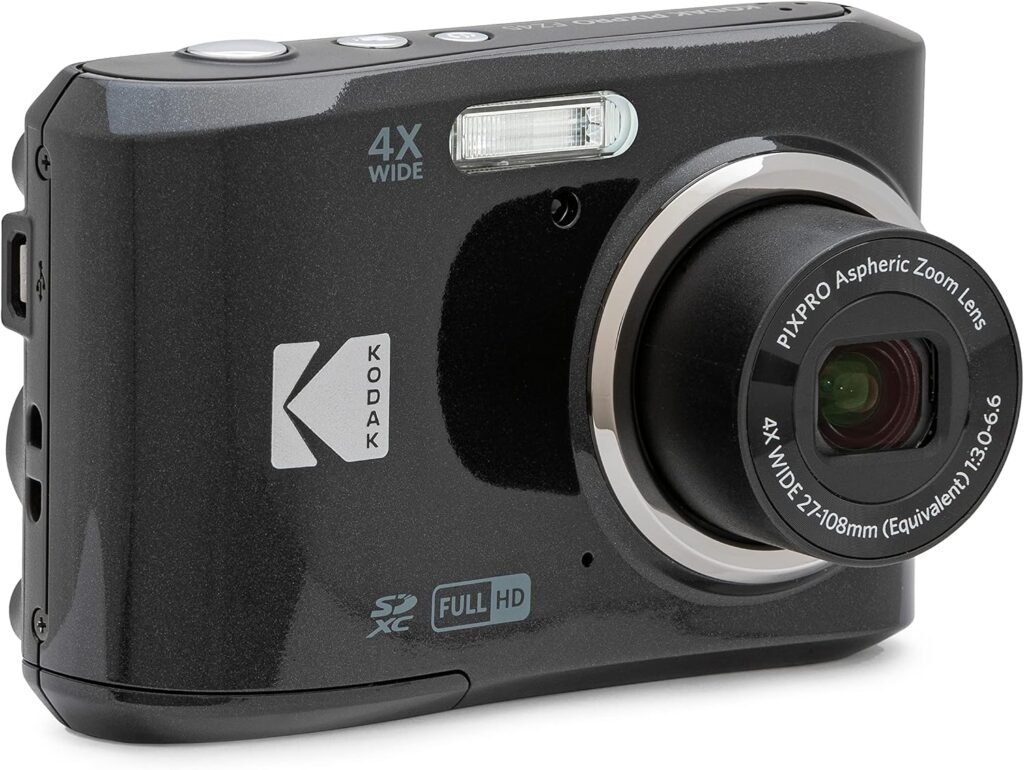
For shoppers in the United States who want a simple point-and-shoot camera, the Kodak PIXPRO Friendly Zoom FZ45 BK offers a basic setup with a 16-megapixel sensor, 4x optical zoom, 1080p video, and AA battery power. It is made for everyday photos, family events, travel, and users who do not want to manage interchangeable lenses or complex camera settings.
The FZ45 is not a replacement for a modern mirrorless camera or a high-end smartphone. Its main strengths are its low learning curve, physical zoom lens, light weight, and replaceable batteries. Its small sensor and modest zoom range also limit image quality in dark scenes and at long distances.
This guide explains the Kodak FZ45’s documented features, setup needs, image quality limits, battery options, storage requirements, and the type of U.S. buyer who should consider it.

Kodak PIXPRO FZ45 Key Takeaways
- Sensor: Approximately 16 megapixels
- Lens: 4x optical zoom
- 35mm-equivalent range: About 27–108mm
- Screen: 2.7-inch LCD display
- Video: Full HD 1080p recording
- Power: Two AA batteries
- Storage: SD and SDHC memory cards; check the camera manual for the supported card size
- Color: Black, often shown as “BK” or “Black”
- Best for: Simple family photos, travel snapshots, school events, and casual users
- Main limits: Small sensor, short zoom range, basic screen, and limited low-light performance
The FZ45 is best understood as a simple compact camera. It gives users a real optical zoom lens and dedicated camera controls, but it does not offer the large sensor, fast lens, advanced autofocus, or interchangeable lenses found on more advanced cameras.
Kodak PIXPRO FZ45 Specifications
The following table summarizes the main specifications commonly listed for the Kodak PIXPRO Friendly Zoom FZ45. Exact package contents and regional specifications may vary, so buyers should confirm details with the seller and the current Kodak PIXPRO documentation.
| Feature | Kodak PIXPRO FZ45 detail |
|---|---|
| Camera type | Compact digital point-and-shoot camera |
| Image resolution | Approximately 16 megapixels |
| Image sensor | 1/2.3-inch CMOS sensor |
| Optical zoom | 4x |
| Focal-length equivalent | Approximately 27–108mm |
| Maximum aperture | About f/2.8–f/6.8 |
| Display | 2.7-inch LCD |
| Still-image format | JPEG |
| Video | Full HD 1080p |
| Image stabilization | Digital image stabilization |
| Battery type | Two AA batteries |
| Memory | SD or SDHC card, subject to documented capacity limits |
| Built-in flash | Yes |
| Connectivity | USB connection for file transfer and charging-related functions, depending on the battery setup |
| Camera body | Black compact body |
What 16 megapixels means
A 16MP image contains enough detail for common prints and online sharing. It can also provide room for moderate cropping in good light.
Megapixel count does not tell the whole image-quality story. The FZ45 uses a small compact-camera sensor. In bright outdoor light, it can produce useful images. In dim rooms, the camera may show more noise, softer detail, and less color depth than a newer smartphone or a camera with a larger sensor.
What the 4x optical zoom does
The lens covers a useful range from a fairly wide 27mm equivalent to a short telephoto 108mm equivalent.
The wide end works well for:
- Family groups
- Indoor rooms
- Travel scenes
- Buildings and landscapes
The telephoto end helps with:
- Portraits
- School performances
- Pets
- Subjects that are a short distance away
A 4x optical zoom is different from digital zoom. Optical zoom changes the lens position and keeps more detail. Digital zoom enlarges the image by cropping or processing it, which can make the result look softer.
What the 2.7-inch LCD can and cannot do
The rear LCD lets you frame images and review photos. It is large enough for basic use, but it is smaller and less detailed than the screens found on many current smartphones.
In bright sunlight, the display may be harder to read. Use the camera’s shade or your hand to block direct glare. Do not judge fine focus only from the LCD; review important photos at a larger size after transferring them.

Setting Up the Kodak PIXPRO FZ45
Setting up the FZ45 takes only a few basic steps, but the memory card and battery choices affect how smoothly the camera works.
1. Insert two AA batteries
Open the battery compartment and install two AA batteries according to the polarity marks inside the camera.
Use batteries of the same type and brand when possible. Do not mix old and new batteries. Do not mix alkaline and rechargeable batteries in the camera.
The FZ45 uses replaceable AA batteries rather than a built-in lithium-ion battery. That is useful when traveling because fresh batteries are easy to find in many U.S. stores. It also adds recurring battery cost and can make the camera heavier than some rechargeable compact models.
2. Add a compatible memory card
Insert an SD or SDHC memory card before taking many photos. Check the current Kodak manual for the supported maximum capacity. A properly formatted card is less likely to cause recording problems.
Before using a card that contains important files, copy those files to a computer. Formatting the card in the camera deletes its contents.
For casual use, a reputable 16GB or 32GB card is often a practical choice if it matches the camera’s documented limits. A larger card is not automatically better. Compatibility matters more than capacity.
3. Set the date, time, and language
Turn on the camera and follow the setup prompts. Set the date and time so that image files contain useful time information.
The exact menu labels may vary by firmware or region. If a setting is unclear, consult the FZ45 user manual rather than changing several options at once.
4. Take a test photo
Start in automatic mode. Point the camera at a well-lit subject, press the shutter button halfway to focus, and then press it fully to take the photo.
Review the image on the LCD. Check for:
- A sharp main subject
- Flash reflections
- Motion blur
- Closed eyes
- Correct framing
- Excessive digital zoom
If the image looks soft, hold the camera still and give the autofocus system time to lock before taking the picture.
5. Transfer photos to a computer or phone
Use a compatible USB cable or remove the memory card and use an SD card reader. The camera may appear as a removable storage device on a computer.
A phone may require a card reader or a suitable USB adapter. The FZ45 does not function like a modern Wi-Fi camera unless a separate accessory or workflow provides that connection.

Kodak FZ45 Image Quality in Everyday Use
The Kodak PIXPRO FZ45 can produce its best results in good light and with a steady subject. It is less suited to dark interiors, fast action, and distant subjects.
Daylight performance
Outdoor daylight gives the small sensor more light to work with. In these conditions, the FZ45 may produce clear photos with pleasing color for:
- Vacations
- Parks
- Pets
- Children
- Casual portraits
- Outdoor gatherings
Use the widest lens setting for groups and scenery. Move closer when possible instead of relying on digital zoom.
Indoor and low-light performance
Dim rooms are more difficult. The camera may raise its ISO setting, use a slower shutter speed, or activate the flash.
These changes can create different problems:
- Higher ISO can add visible grain.
- Slow shutter speeds can cause blur.
- Flash can create harsh shadows.
- Digital stabilization cannot fully correct subject movement.
For indoor photos, ask the subject to stay still, support the camera with both hands, and use available light when possible. A nearby lamp or window can help more than increasing digital zoom.
Moving subjects
The FZ45 is not designed as a specialist sports camera. Fast movement can appear blurred, especially indoors or in low light.
To improve results:
- Use good light.
- Keep the zoom near the wide end.
- Press the shutter halfway before the action reaches the frame.
- Take several photos.
- Review the images and keep the sharpest one.
Portraits
The 108mm equivalent telephoto end can help create a more natural portrait perspective than standing very close with the wide-angle setting. Step back, zoom in slightly, and place the subject in even light.
The camera does not create the same background blur as a camera with a larger sensor and a wide-aperture lens. Good lighting and a clean background matter more.

Kodak FZ45 Video Recording
The Kodak PIXPRO FZ45 supports Full HD video recording, commonly listed as 1080p. This is enough for family clips, travel records, classroom projects, and basic online sharing.
Video quality depends on more than resolution. Audio, light, camera movement, and storage speed also affect the result.
For better clips:
- Clean the lens before recording.
- Hold the camera with both hands.
- Avoid rapid zooming.
- Record in bright, even light.
- Keep important action near the center of the frame.
- Use a memory card that meets the camera’s requirements.
- Keep recording clips short when battery power is limited.
The FZ45 is not a professional video camera. It may lack features such as a microphone input, advanced audio control, optical stabilization, or modern wireless transfer. Buyers who need those features should compare it with a smartphone, action camera, or interchangeable-lens camera.

Battery Life and Power Advice
The FZ45’s use of two AA batteries is one of its clearest design choices. It makes replacement simple, but battery life depends on the battery type, flash use, zooming, video recording, LCD use, and temperature.
Alkaline AA batteries
Alkaline batteries are widely available across the United States. They are convenient for occasional use but may cost more over time and can drain faster during heavy camera use.
Remove alkaline batteries if the camera will be stored for a long period. Old batteries can leak and damage electronic contacts.
Rechargeable Ni-MH batteries
Rechargeable nickel-metal hydride, or Ni-MH, AA batteries can reduce waste and long-term cost. Use a charger designed for the exact battery type.
Do not place loose batteries in a pocket or bag with coins, keys, or other metal objects. Metal contact can cause heat or a short circuit.
Cold-weather use
Cold conditions can reduce battery performance. Carry spare batteries in an inside pocket and install them only when needed. Keep the camera protected from sudden condensation when moving between cold outdoor air and a warm indoor space.

Memory Cards, File Storage, and Care
A memory card stores the photos and videos taken by the camera. It does not increase image quality, but a reliable card reduces the risk of recording errors.
Card selection
Use a compatible SD or SDHC card listed in the camera documentation. Avoid assuming that every high-capacity SDXC card will work. Older compact cameras may have limits that newer cards exceed.
Format the card in the camera after backing up its files. Formatting in the camera helps create the file structure the device expects.
File transfer
Copy photos to a computer before deleting them from the card. For long-term storage, keep at least two copies in separate places.
A simple backup plan is:
- One copy on a computer
- One copy on an external drive or trusted cloud service
Do not treat the camera card as a permanent archive. Memory cards can fail, become corrupted, or be lost.
Lens and body care
Use a clean microfiber cloth made for optical surfaces. Do not use household glass cleaner on the lens.
Keep sand, dust, water, and extreme heat away from the camera. The FZ45 is a basic compact camera and should not be treated as waterproof or weather-sealed unless Kodak specifically documents that protection.

Common Kodak FZ45 Problems and Fixes
The camera will not turn on
Check these items in order:
- Confirm that both batteries are installed correctly.
- Try a fresh pair of batteries.
- Remove the memory card and test the camera without it.
- Check for dirt or corrosion on the battery contacts.
- If the camera still does not start, stop using it and seek service or seller support.
Do not scrape contacts aggressively or open the camera body. Internal parts may retain electrical charge, and opening the camera can cause damage.
The camera says the card is full
Transfer files to a computer, confirm the backup, and format the card in the camera. If the message returns, try a compatible card from a reliable brand.
Do not delete files until you have confirmed that the backup opens correctly.
Photos are blurry
Blur usually comes from camera movement, subject movement, poor light, or missed focus.
Try holding the camera with both hands, keeping elbows close to the body, and pressing the shutter gently. Add light or use the flash when suitable. If only some photos are blurry, the subject may have moved during exposure.
The flash does not fire
The flash may be disabled, still charging, or unnecessary in the selected mode. Check the flash setting and allow time for the flash to recharge.
Flash range is limited. A built-in flash cannot properly light a distant stage or large outdoor scene.
Video stops early
A full card, low battery, unsupported card, or file-size limit may stop recording. Use a charged or fresh battery set, confirm free card space, and check the manual for recording limits.

Who Should Buy the Kodak PIXPRO FZ45?
The FZ45 makes sense for a buyer who wants a simple camera with:
- A physical optical zoom
- Replaceable AA batteries
- Dedicated photo controls
- A lightweight body
- Basic Full HD video
- A lower-complexity alternative to an interchangeable-lens camera
It may suit a child with supervision, a casual traveler, a family camera, or someone who prefers a separate camera instead of using a phone.
The FZ45 is less suitable for:
- Night photography
- Sports and wildlife at long distances
- Professional portraits
- Large prints made from heavily cropped images
- Advanced video work
- Fast wireless sharing
- Users who need waterproof protection
- Photographers who want manual lens changes or a large sensor
The most important trade-off is simplicity versus performance. The FZ45 is easy to understand, but its compact sensor and basic lens limit what it can do in poor light and demanding scenes.

Kodak FZ45 Compared With a Smartphone
A current smartphone will often have stronger image processing, better low-light software, faster sharing, and a sharper display. It may also produce better results in difficult lighting through multi-frame processing.
The FZ45 still offers a few practical differences:
- A dedicated optical zoom lens
- Physical camera controls
- Replaceable AA batteries
- A separate device for users who want to leave their phone aside
- Simple JPEG files that can be copied without a phone app
The better choice depends on the situation. For social media, indoor scenes, and automatic HDR, a modern smartphone may perform better. For a simple camera with optical zoom and no need for a cellular device, the FZ45 remains useful.
Do not compare megapixels alone. Compare the sensor, lens, software, battery system, storage method, and the way you plan to share photos.
Frequently Asked Questions
Is the Kodak PIXPRO FZ45 good for beginners?
Yes. Its automatic operation, compact body, physical zoom, and simple controls make it suitable for beginners. New users should learn basic habits such as holding the camera steady, using good light, and checking focus before pressing the shutter fully.
Does the Kodak FZ45 have Wi-Fi?
The FZ45 is generally sold as a basic USB-based compact camera rather than a Wi-Fi camera. Confirm the exact model listing before buying if wireless transfer is essential.
Does the Kodak FZ45 use rechargeable batteries?
It uses two AA batteries. Rechargeable Ni-MH AA batteries may be used when they match the camera’s requirements. Use the correct charger and do not mix battery types.
Can the Kodak FZ45 record 4K video?
The FZ45 is commonly documented as supporting Full HD 1080p video, not 4K. Buyers who need 4K should consider a newer camera, smartphone, or action camera.
What memory card should I buy for the Kodak FZ45?
Choose a reliable SD or SDHC card within the capacity supported by the current Kodak documentation. A 16GB or 32GB card may be a practical starting point, but confirm the limit for your exact camera before purchase.
Final Recommendation
The Kodak PIXPRO Friendly Zoom FZ45 BK 16MP Digital Camera is a straightforward compact camera for bright-light snapshots, family use, travel, and beginners. Its 4x optical zoom, AA battery design, 1080p video, and simple controls are useful for buyers who want a dedicated camera without advanced features.
Its limits are equally clear: low-light images may be noisy, fast subjects can blur, the zoom is modest, and wireless sharing may require a separate transfer method. Choose the FZ45 when ease of use and replaceable batteries matter more than advanced image quality. Choose a modern smartphone or larger-sensor camera when low-light performance, fast action, strong video, or creative control is the priority.

