
The ROVE R2 4K DUAL is a two-camera dash cam system for drivers in the United States who want front and rear video, 4K front recording, GPS data, and app-based file access. Its front camera uses a Sony STARVIS 2 sensor, while the rear camera records the road behind the vehicle.
It can help document crashes, traffic stops, road hazards, and insurance claims. However, image quality depends on light, lens position, windshield condition, memory-card health, and the exact hardware revision. Confirm the current manual and package specifications before buying accessories.

What Is the ROVE R2 4K DUAL Dash Cam?
The ROVE R2 4K DUAL is a dual-channel car camera. One camera faces forward, and a second camera mounts near the rear windshield. Both views can record at the same time.
The front camera records in up to 4K UHD resolution, commonly listed as 3840 × 2160 pixels. The rear camera records in a lower Full HD resolution. This design gives the front view more detail while keeping the rear camera smaller and easier to install.
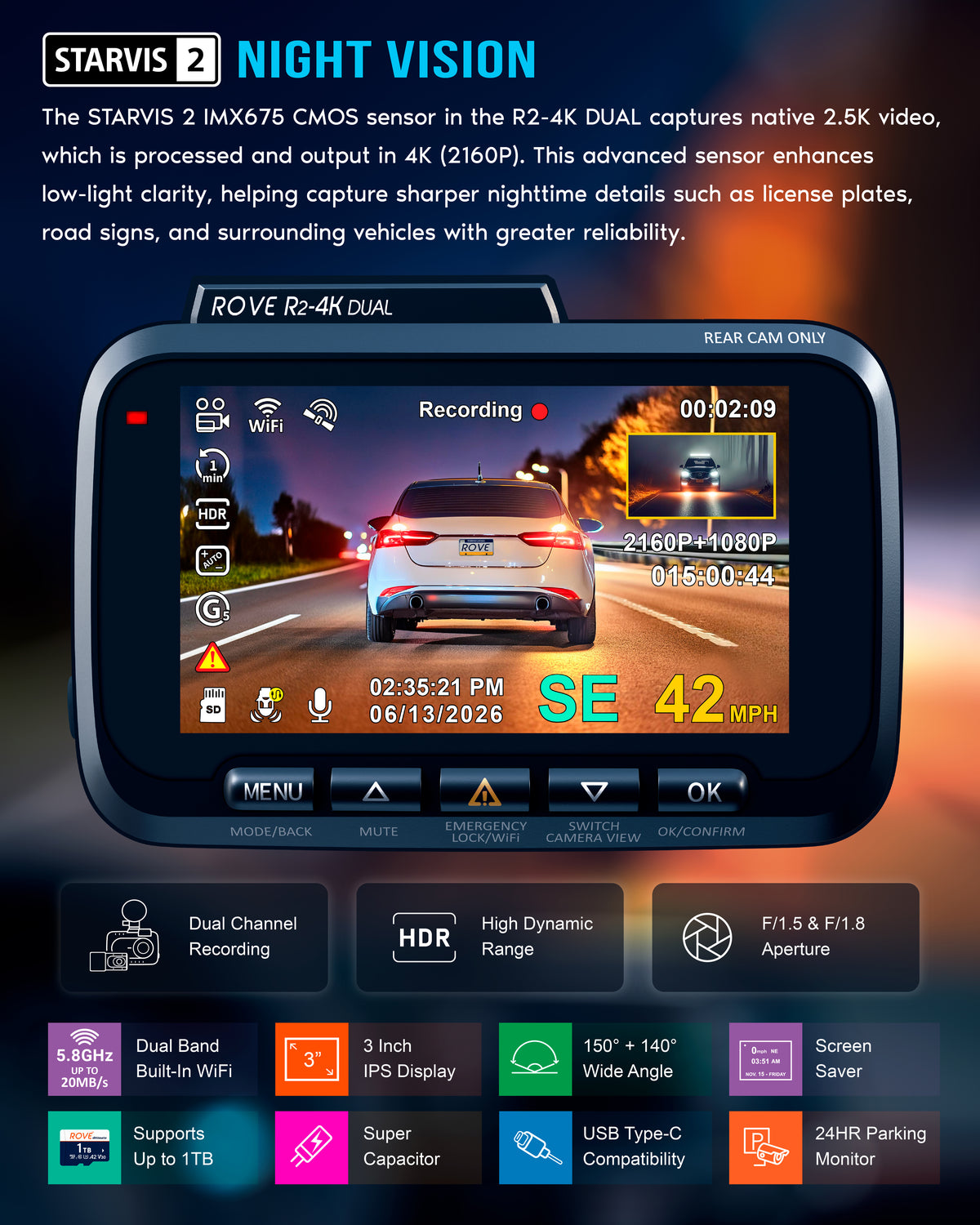
ROVE markets the system with Sony STARVIS 2 image sensors. STARVIS 2 is a back-illuminated sensor technology designed to improve light capture and reduce noise, especially in dark scenes. A sensor can improve the raw image, but it cannot remove every problem caused by glare, rain, tinted glass, dirty windows, or poor exposure.
Main functions
Depending on the package and firmware version, the R2 4K DUAL includes:
- Front 4K video recording
- Rear Full HD video recording
- Sony STARVIS 2 sensor technology
- Built-in GPS
- Wi-Fi connection to a smartphone
- Loop recording
- Emergency video locking
- Parking surveillance support with a compatible hardwire kit
- A built-in display
- Supercapacitor-based power retention
- MicroSD card recording
The precise frame rate, viewing angle, storage limit, Wi-Fi band, and accessory contents can vary by revision or seller bundle. Always compare the model number on the box with the current ROVE manual.
What STARVIS 2 means in practice
STARVIS 2 does not mean that every night recording will be bright or perfectly clear. It means the image sensor is designed to capture more usable light than many older designs.
In real use, the front camera may show more detail in dim streets and at night than a basic 1080p camera. Headlights can still create glare. License plates may remain unreadable when a vehicle is moving fast, angled away, overexposed, or too far from the camera.

ROVE R2 4K DUAL Specifications at a Glance
The table below summarizes the commonly documented configuration. Check the current U.S. product page and manual for the exact version you plan to purchase.
| Feature | ROVE R2 4K DUAL |
|---|---|
| Camera layout | Front and rear |
| Front resolution | Up to 4K UHD |
| Rear resolution | Full HD class |
| Image sensor | Sony STARVIS 2 technology |
| GPS | Built in on listed versions |
| Smartphone access | Wi-Fi and ROVE app |
| Storage | MicroSD card; capacity and speed limits apply |
| Recording mode | Loop recording |
| Parking mode | Requires suitable power connection |
| Display | Built-in screen |
| Power design | Supercapacitor-based shutdown support |
| Intended market | Passenger vehicles and light vehicles |
Resolution is not the same as evidence quality
A 4K file contains more pixels than a 1080p file. That can help when you crop or inspect a distant object. It does not guarantee that a plate or road sign will be readable.
The camera must also have:
- A clean windshield
- Correct focus
- Proper exposure
- A stable mount
- Enough light
- A useful viewing angle
- Adequate distance from the subject
A 4K camera pointed through a dirty windshield may produce less useful evidence than a lower-resolution camera with a clear view.
Front and rear camera trade-offs
The front camera receives the highest resolution because it usually covers the main driving scene. The rear camera adds important context for rear-end collisions, tailgating, lane changes, and parking incidents.
The rear camera normally has a longer cable run and a more difficult installation path. Hatchbacks, SUVs, and vehicles with moving liftgates need extra care. The cable must not interfere with airbags, hinges, pedals, or the driver’s view.

How to Install the ROVE R2 4K DUAL
A safe installation starts with the camera position, not the power cable. The front camera should sit high on the windshield without blocking the driver’s view.
What you need
Prepare:
- The ROVE front camera
- The rear camera
- The supplied power cable
- The rear-camera cable
- A compatible microSD card
- A plastic trim tool
- A clean microfiber cloth
- A 12-volt vehicle power outlet, unless using a hardwire kit
- The current ROVE manual
Use a high-endurance microSD card that matches the camera’s required speed and capacity. Dash cams write data continuously, so ordinary low-end cards may fail sooner.
Front camera installation
- Park on level ground and switch off the vehicle.
- Clean the windshield area behind the rearview mirror.
- Position the camera where it has a clear road view.
- Keep the display and controls accessible during setup.
- Connect the power cable.
- Start the vehicle and confirm that the camera powers on.
- Adjust the lens so the horizon is near the middle of the image.
- Check that the hood does not fill too much of the frame.
- Confirm that the camera does not block the driver’s view.
Do not mount the camera in a location that obstructs an airbag, safety sensor, or required field of view. Some vehicles place camera and rain sensors near the rearview mirror. Leave those systems clear.
Rear camera installation
- Choose a position near the top center of the rear windshield.
- Clean the glass and attach the rear camera.
- Route the cable along the headliner and trim.
- Keep the cable away from side-curtain airbags.
- Connect the rear cable to the front camera.
- Start the vehicle and check the rear image.
- Open and close the trunk or liftgate carefully.
- Confirm that the cable has enough slack near moving sections.
- Secure loose cable so it cannot fall near the pedals.
Do not run the rear-camera cable across the steering column, brake pedal, accelerator, or airbag deployment path. If trim removal feels unsafe, have a qualified automotive installer perform the work.
Signs of a correct installation
A successful installation should show:
- A stable front image
- A stable rear image
- No loose cable near the driver
- Correct date and time
- GPS location or speed data, if enabled
- Continuous file creation
- No severe vibration
- A clear view in both directions
If the rear image is black, check the connector first. Then inspect the cable for damage and confirm that the camera is selected or enabled in the settings.

How to Set Up the ROVE R2 4K DUAL
Set up the camera before relying on it for a trip or insurance record. The first setup should include formatting the memory card inside the camera.
Recommended first-time setup
- Insert a compatible microSD card while the camera is off.
- Power on the camera.
- Set the time zone for your U.S. location.
- Set the date and time.
- Format the card through the camera menu.
- Connect the phone to the camera’s Wi-Fi network.
- Install the official ROVE app from a trusted app store.
- Pair the camera and check live views.
- Confirm that front and rear recording are active.
- Drive a short test route.
- Review the saved files on the camera or in the app.
- Reformat the card in the camera at regular intervals.
The camera may not have cellular service. Its Wi-Fi feature usually creates a local connection between the camera and phone. That connection can let you view or download files, but it does not necessarily provide internet access.
Why formatting matters
Formatting removes old files and creates the file structure the camera expects. A card may appear to work while still producing damaged or missing clips.
Back up important recordings before formatting. Formatting is destructive and can erase evidence.
Set the correct time
Time stamps matter when you explain an incident. A wrong date or time can make a file harder to use.
GPS time may assist with clock accuracy, but the camera can take time to acquire a satellite signal. Confirm the displayed time after installation and after a factory reset.
Video Quality and Night Recording
The ROVE R2 4K DUAL is best suited to drivers who want more front detail than a basic 1080p dash cam provides. The front 4K mode can help when reviewing road signs, lane positions, and nearby vehicles.
The rear camera is still valuable even though it records at a lower resolution. A rear recording can show the other vehicle’s position, impact direction, following distance, and actions before a collision.
Daytime performance factors
For the clearest daytime video:
- Keep the windshield clean inside and out.
- Remove stickers near the lens.
- Avoid placing the lens behind heavy tint.
- Use the correct exposure setting.
- Keep the lens level.
- Reduce dashboard reflections.
- Check the image after installing sun shades or windshield accessories.
A reflective dashboard can create a bright band across the lower part of the image. A polarizing filter may reduce reflections on some dash cams, but it can also reduce light. Use only a filter made for the ROVE lens and confirm that it does not create vignetting.
Night performance factors
Night video is most affected by:
- Oncoming headlights
- Street lighting
- Wet pavement
- Dirty glass
- Windshield reflections
- Motion blur
- Incorrect exposure
STARVIS 2 can improve low-light capture, but it cannot make a distant moving plate readable in every scene. A plate may bloom into white glare when headlights shine toward the camera.
Keep expectations realistic: dash cam video can document the event even when it cannot identify every plate.

Storage, Loop Recording, and File Protection
The ROVE R2 4K DUAL needs a reliable microSD card because dual-camera recording creates a steady data load. Use a card that meets the manufacturer’s speed and capacity requirements.
Loop recording
Loop recording divides footage into short clips. When the card fills, the camera normally replaces the oldest unlocked clips.
This prevents the camera from stopping after the card becomes full. It also means that important files must be locked or copied quickly.
Emergency files
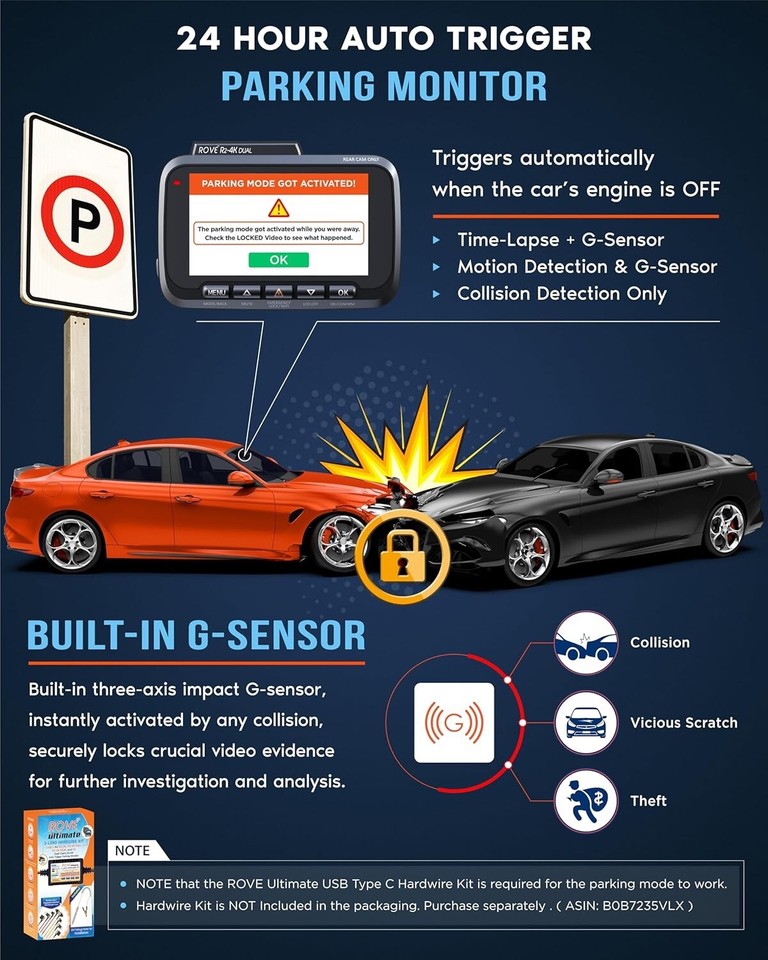
The camera may lock a file when its G-sensor detects a sudden impact. You can also use the emergency button when you see an event.
A locked file may remain protected from normal loop deletion. However, storage space is still limited. If too many files are locked, the card can become full and recording may stop.
Practical storage routine
Use this routine:
- Check the card once a month.
- Review a short clip from both cameras.
- Copy important files to a phone or computer.
- Format the card in the camera after backup.
- Replace a card that produces repeated errors.
- Do not remove the card while recording.
A dash cam is not a permanent archive. Treat the memory card as temporary storage.
Choosing a memory card
The exact maximum card size can vary by firmware and product revision. The current ROVE manual should control the decision.
Choose a card that is:
- Rated for continuous video recording
- Fast enough for the selected resolution
- From a known manufacturer
- Within the camera’s documented capacity
- Purchased from a trusted seller
A card that works in a phone may still fail in a dash cam. Continuous writing creates a different workload.

Parking Mode: What It Requires
Parking mode can monitor a parked vehicle, but it needs power after the ignition is off. The standard cigarette-lighter outlet may shut off with the vehicle and may not support long-term parking recording.
A compatible hardwire kit can provide power from the vehicle’s fuse box. It should include low-voltage protection that cuts power before the battery is drained too far.
Common parking-mode methods
| Method | Benefit | Limitation |
|---|---|---|
| Ignition-switched outlet | Simple installation | Usually stops when the vehicle turns off |
| Always-on 12-volt outlet | May support parking mode | Can drain the battery |
| Hardwire kit | Cleaner wiring and controlled power | Requires careful installation |
| External dash-cam battery | Reduces vehicle-battery load | Adds cost and installation work |
Before using parking mode, confirm:
- The camera supports the selected parking mode.
- The power source stays active.
- The hardwire kit matches the camera.
- Low-voltage cutoff is enabled.
- The vehicle battery is healthy.
- The installation does not affect factory electronics.
A weak battery, extreme cold, and long parking periods can reduce available power. If the vehicle fails to start after installation, stop using the parking setup and have the electrical system checked.
GPS, Wi-Fi, and the ROVE App
GPS can attach location and speed information to recordings. That information may help establish where a clip was recorded. It can also raise privacy concerns because location data may remain in the file.
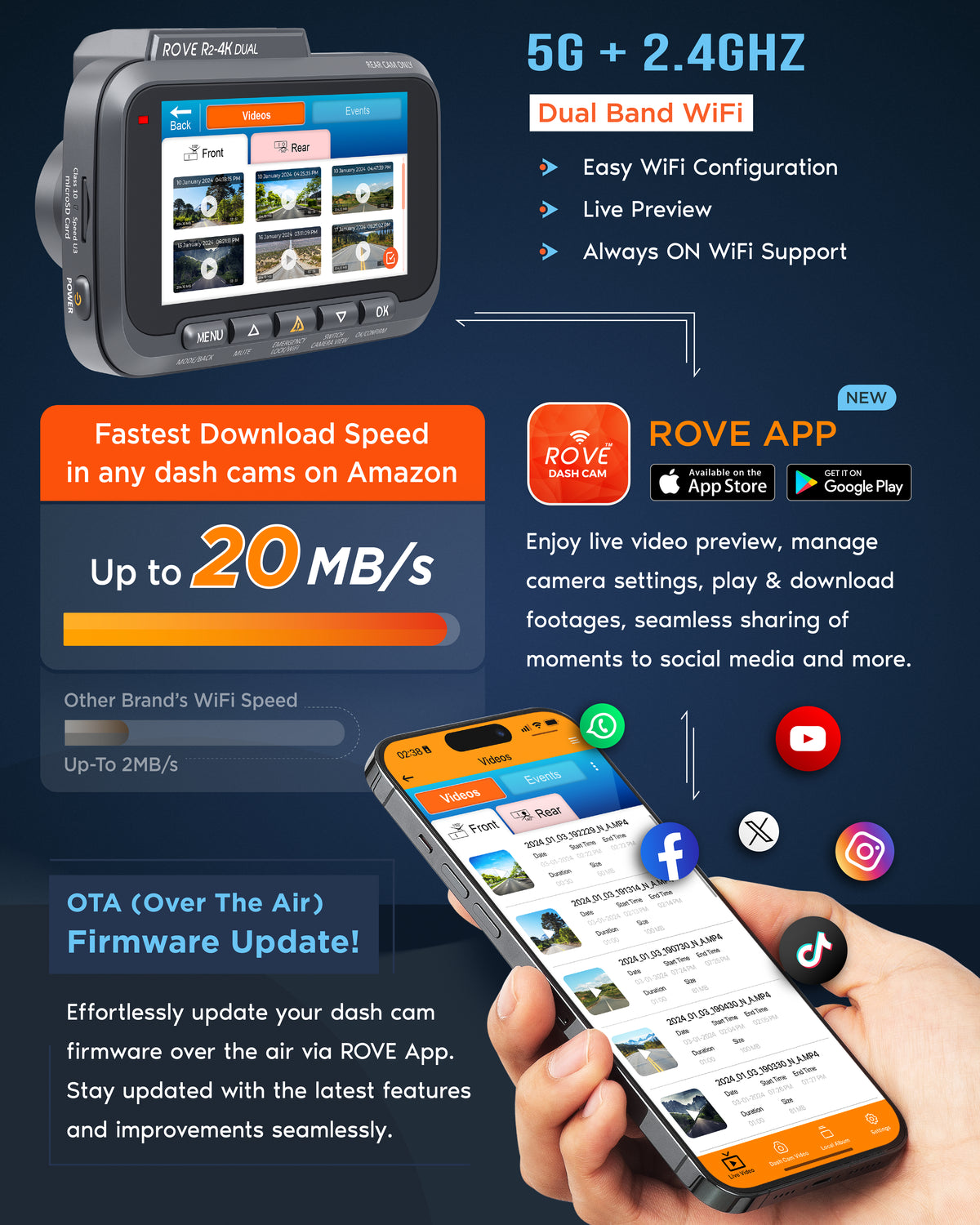
Wi-Fi is useful for short-range file access. It can save time when you need to send a clip from the roadside. For large 4K files, a computer and card reader may be faster.
Safer app workflow
- Park before using the app.
- Turn on the camera’s Wi-Fi.
- Connect the phone to the camera network.
- Open the official ROVE app.
- View the desired clip.
- Download the file to the phone.
- Confirm that the downloaded file plays.
- Share only the needed file.
Do not operate the app while driving. Some states also regulate handheld phone use, so handle the phone only when parked and safe.
GPS privacy
Before posting a dash cam file online, check whether it includes:
- GPS coordinates
- Speed
- Date and time
- Vehicle information
- Audio
- Faces
- License plates
Remove or blur sensitive details when appropriate.

Common Problems and Fixes
Troubleshoot in a safe order. Stop driving before handling the camera or phone.
The camera will not turn on
Possible causes include:
- Loose power connection
- Failed vehicle outlet
- Damaged cable
- Blown fuse
- Low vehicle voltage
- Faulty memory card
Try a different compatible power outlet. Then remove and reinstall the memory card with the camera off. If the camera still fails, test the supplied cable and contact ROVE support.
The camera keeps restarting
Repeated restarts often point to a weak power supply, damaged cable, overheating, or a failing memory card.
Check the card first. Back up any usable clips, format the card in the camera, and test again. If the problem remains, use a known compatible card and inspect the power connection.
The rear camera is missing from the recording
Check the rear cable at both ends. Look for bent pins, partial insertion, or cable damage.
Then confirm that rear recording is enabled. If the rear view works only when the cable is moved, stop using that cable and replace it.
The memory card error returns
A recurring card error can mean that the card is worn out, too slow, too large for the camera, counterfeit, or incompatible.
Replace it with a high-endurance card that meets the current ROVE requirements. Do not rely on a card that repeatedly fails simply because it works after a format.
The video looks blurry
Clean both sides of the windshield. Clean the lens with a soft cloth. Check for protective film on the lens.
If only one area remains blurry, the camera may have a focus or lens problem. Do not open the camera housing. Contact the manufacturer or seller.
The camera gets hot
A dash cam can become warm during 4K recording, charging, and summer parking. Direct sun through the windshield can raise temperatures further.
Keep vents clear and avoid covering the camera. If it shuts down, smells unusual, shows a swollen part, or damages the cable, disconnect it and seek technical support.
U.S. Legal and Privacy Considerations
Dash cam use is generally common in the United States, but state laws differ. Rules can affect windshield mounting, audio recording, phone use, and privacy.
Windshield mounting
Some states and cities restrict objects placed on the windshield. Mount the camera in a location allowed by local law and outside the driver’s required view.
The safest general practice is to place it high and near the rearview mirror while keeping sensors and visibility clear. Check your state’s vehicle equipment rules rather than assuming one position is legal everywhere.
Audio recording
The ROVE camera may record cabin or road audio when audio recording is enabled. U.S. wiretap and consent laws vary by state.
If passengers are recorded, consent requirements may apply. Disable audio when you do not need it, and obtain legal advice for a specific dispute or recording practice.
Sharing recordings
A recording may contain private information about other people. Consider blurring faces, plates, home addresses, and GPS data before posting publicly.
A dash cam file can support an insurance claim, but it does not automatically prove fault. Preserve the original file and provide context.

ROVE R2 4K DUAL: Who Should Buy It?
The ROVE R2 4K DUAL fits drivers who want:
- A high-resolution front view
- Rear coverage in the same system
- GPS data
- Phone-based file access
- A built-in display
- Parking surveillance with added power hardware
- More detail than a basic 1080p front camera
It may not fit drivers who want a hidden installation, a simple single-camera setup, cloud video storage, or a camera with advanced driver-assistance features.
The dual-camera design adds installation work. The 4K front mode also creates larger files and places more demand on the memory card. Buyers should budget for a reliable card and, if needed, a hardwire kit.
Important limitations
The R2 4K DUAL is not a substitute for:
- Safe driving
- A vehicle alarm
- A cellular security system
- Professional accident reconstruction
- A guaranteed license-plate reader
- A factory safety system
It records what its lenses can see. It cannot record through an obstruction or recover details lost to glare and motion blur.

Frequently Asked Questions
Does the ROVE R2 4K DUAL record front and rear video at the same time?
Yes. It is designed as a dual-channel system that records the front and rear cameras together. Confirm that the rear cable is connected and that rear recording is enabled before driving.
Does the ROVE R2 4K DUAL need a hardwire kit?
No for basic driving recordings from a powered 12-volt outlet. A hardwire kit is generally needed for parking mode when the vehicle’s outlet turns off with the ignition.
What memory card should I use?
Use a high-endurance microSD card that meets the latest ROVE speed and capacity requirements. Avoid unknown brands and cards that repeatedly produce errors.
Can the camera read license plates at night?
It may capture plates in favorable conditions, but no dash cam can guarantee readable plates in every night scene. Distance, speed, headlights, rain, exposure, and motion blur have a major effect.
Does GPS track the car when the camera is off?
GPS data is associated with recordings when the camera is operating and has a satellite signal. The camera is not a replacement for a dedicated live vehicle tracker unless the specific system includes a separate cellular tracking service.
Can I use the ROVE R2 4K DUAL in a commercial vehicle?
It may work in many passenger vehicles and light commercial vehicles, but check the vehicle’s power system, windshield rules, mounting limits, and company privacy policy. Professional installation may be wise for larger vehicles.
Final Recommendation
The ROVE R2 4K DUAL Dash Cam is a practical choice for U.S. drivers who want a 4K front camera, rear coverage, GPS, and local smartphone access in one system. Its STARVIS 2 front sensor may improve detail in low light, but good installation and a reliable memory card matter just as much.
Buy it when front-and-rear coverage is more important than a very simple installation. Before relying on it, format a compatible card, set the correct time, test both cameras, protect important files, and review your state’s mounting and audio rules.

