
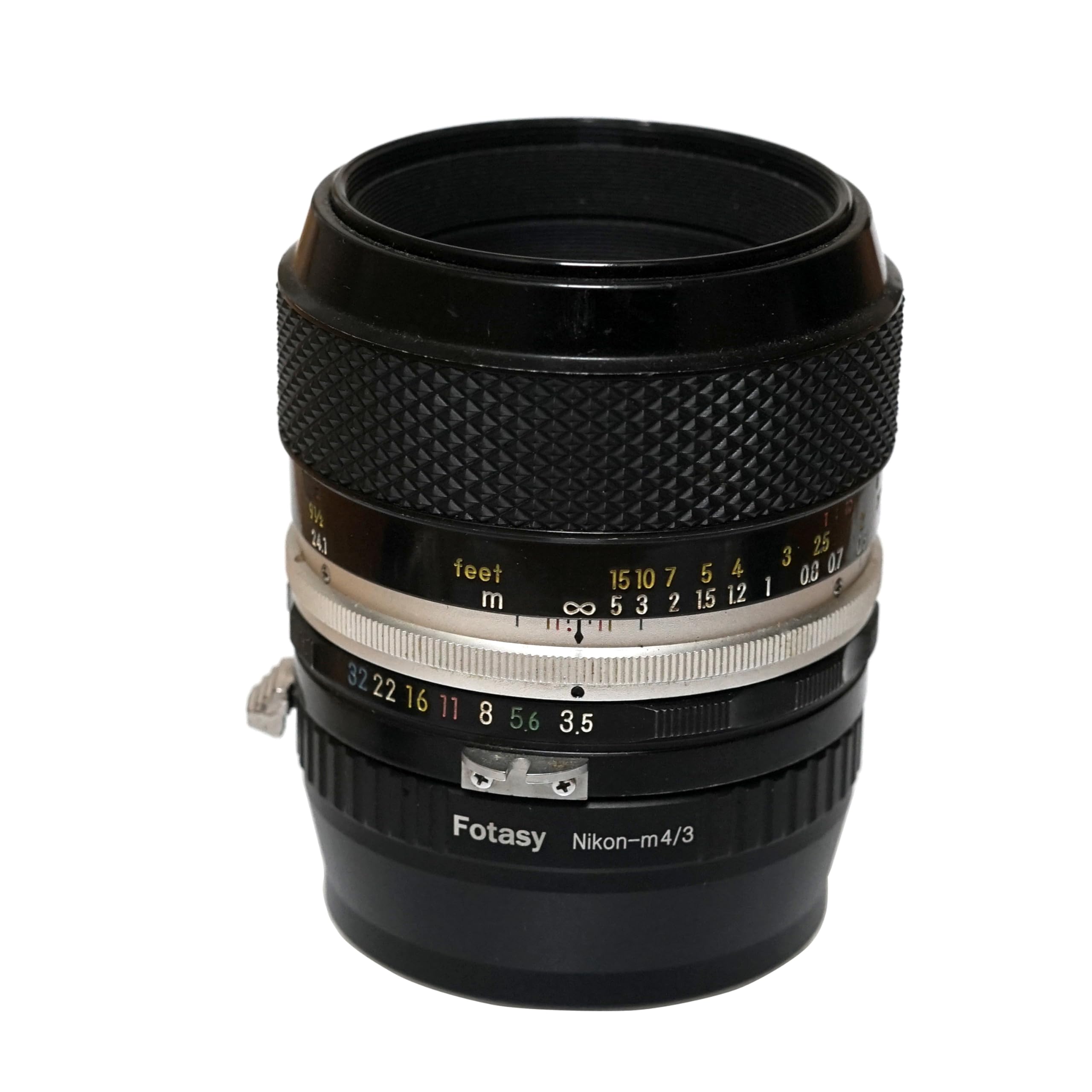
For photographers in the United States, the Fotasy Manual NK Lens to m43 Adapter offers a simple way to use many Nikon F-mount lenses on Micro Four Thirds cameras. It creates a physical connection between the lens and camera, but it does not provide autofocus, electronic aperture control, or image stabilization.
The adapter can be useful for portraits, video, landscape work, and budget lens systems. The main trade-off is manual operation. You must set focus and, depending on the lens and adapter version, aperture by hand.

What Is the Fotasy NK to m43 Adapter?
The Fotasy NK adapter is a Nikon F-mount lens to Micro Four Thirds camera adapter. “NK” refers to the Nikon lens side, while “m43” or “MFT” refers to the Micro Four Thirds camera mount.
The adapter acts like a spacer between the lens and camera. It does not contain optical glass in the usual manual adapter design. As a result, it normally does not change the lens’s light transmission or maximum aperture.
Compatible Micro Four Thirds cameras may include models from:
- OM SYSTEM and Olympus
- Panasonic Lumix
- Blackmagic Design cameras with a Micro Four Thirds mount
- Other cameras that use the standard Micro Four Thirds mount
The exact Fotasy product version matters. Some listings may describe the adapter as Nikon F to MFT, Nikon G to MFT, or Nikon AI/F to MFT. Check the product label and seller description before purchase.
What “manual” means
A manual adapter has no electronic contacts. The camera cannot communicate with the lens through the adapter.
You should expect the following:
- Manual focus only
- Manual aperture control on compatible lenses
- No lens-based autofocus
- No electronic EXIF lens data
- No automatic focal-length reporting
- No electronic control of Nikon lenses that require camera commands
The camera may still provide useful aids such as focus peaking, magnified view, and exposure preview. These features come from the camera, not the adapter.
Nikon F-Mount Lens Compatibility
The adapter is designed for Nikon F-mount lenses, but not every Nikon lens behaves in the same way. Nikon has made many F-mount lens types over several decades, and their aperture systems differ.
Lens types that usually work best
Older Nikon F-mount lenses with a physical aperture ring are often the easiest to use. These include many:
- Nikon AI and AI-S lenses
- Nikon Series E lenses
- Older non-G Nikkor lenses
- Compatible third-party F-mount lenses with a manual aperture ring
With these lenses, you set the aperture directly on the lens. The camera then meters the light, if its exposure mode supports metering with a manual lens.
Nikon G lenses
Nikon G lenses do not have a traditional aperture ring. Their aperture is controlled by a mechanical lever on the lens mount.
A simple Nikon F-to-MFT adapter may leave the lens at its default aperture. Some adapters include a mechanical control ring that moves the G lens aperture lever. The range may not match the exact f-stop markings, and the control may be approximate.
Before buying, confirm that the Fotasy model specifically supports Nikon G lenses if you plan to use them. Do not assume that every NK-to-MFT adapter includes a G-type aperture control.
Nikon E lenses and electronic lenses
Nikon E-type lenses use electronic aperture control. A fully manual adapter cannot send the electronic commands needed to operate them.
Many modern Nikon F-mount lenses also rely on the camera for functions such as:
- Aperture control
- Autofocus
- Vibration reduction settings
- Lens data communication
These functions may not work through a basic Fotasy adapter.
Nikon Z-mount lenses
Nikon Z lenses are not Nikon F-mount lenses. They use a newer mirrorless mount and require a different adapter design.
A Fotasy NK adapter should not be used as a Nikon Z-to-MFT adapter. Check the mount mark on the lens before ordering.

How the Adapter Changes Focal Length and Field of View
The adapter does not change the lens’s stated focal length. A 50mm lens remains a 50mm lens in optical terms. However, a Micro Four Thirds sensor captures a smaller part of the image circle than a full-frame sensor.
The common comparison uses a 2x field-of-view factor:
| Nikon F lens | Approximate full-frame field of view on MFT |
|---|---|
| 20mm | Similar to 40mm |
| 24mm | Similar to 48mm |
| 35mm | Similar to 70mm |
| 50mm | Similar to 100mm |
| 85mm | Similar to 170mm |
| 105mm | Similar to 210mm |
| 200mm | Similar to 400mm |
These are field-of-view comparisons, not changes to the lens’s real focal length.
A 50mm lens still has the perspective and optical behavior of a 50mm lens from the same shooting position. The crop makes the view look tighter. This can help with distant subjects, but it can make wide-angle photography more difficult.
What happens to depth of field?
The adapter does not increase the lens’s actual maximum aperture. A 50mm f/1.8 lens remains an f/1.8 lens for exposure.
However, the Micro Four Thirds format gives a deeper depth of field at the same framing and aperture than a full-frame system. If you want a similar view and background blur to a full-frame camera, you may need a wider aperture or a lens with a longer focal length.
This distinction matters:
- Exposure: A 50mm f/1.8 still admits the light of an f/1.8 lens.
- Field of view: The view is roughly similar to a 100mm lens on full frame.
- Background blur: The result may look less blurred than a full-frame 100mm lens at f/1.8.
How to Mount and Use the Fotasy Adapter
Mount the adapter in a clean, dry place. Avoid forcing either the lens or camera mount.
Before you begin
You need:
- A Nikon F-mount lens
- A Micro Four Thirds camera
- The Fotasy NK-to-MFT adapter
- A charged camera battery
- A clean, stable work area
Turn the camera off before attaching the lens and adapter. Remove both caps and inspect the mounts for dust or damage.
Mounting steps
-
Attach the adapter to the lens.
Align the Nikon mounting marks. Rotate the adapter until it locks into place. -
Attach the lens and adapter to the camera.
Align the Micro Four Thirds marks. Rotate until the camera mount clicks into position. -
Enable the camera’s release-without-lens setting.
Many MFT cameras block shutter release when they do not detect an electronic lens. The setting may be called “Shoot Without Lens” or have a similar name. -
Set the lens aperture.
Use the aperture ring if the lens has one. If the Fotasy adapter has a G-lens control, adjust it carefully and check the result on the camera display. -
Choose a focusing method.
Use manual focus. Focus peaking and magnified view can improve accuracy. -
Select an exposure mode.
Aperture-priority mode often works well. Manual exposure is another reliable option. -
Take a test image.
Check focus, exposure, vignetting, and the corners of the frame before beginning important work.
To remove the setup, turn the camera off, press the lens release button, and rotate the adapter and lens away from the camera. Do not pull the lens straight out.

Exposure and Camera Settings
A manual Nikon F-to-MFT adapter does not send aperture information to the camera. The camera must estimate exposure from the light reaching the sensor.
Aperture-priority mode
Aperture-priority mode is often the simplest choice:
- Set the aperture on the lens or adapter.
- Set the camera to A or Aperture Priority mode.
- Let the camera select the shutter speed.
- Watch for motion blur and underexposure.
The camera may not display the selected f-stop because it cannot read the lens. That is normal.
Manual exposure
Manual mode gives more control:
- Choose the aperture.
- Set the shutter speed.
- Adjust ISO as needed.
- Use the exposure meter, histogram, or preview image.
- Recheck exposure when the light changes.
For video, manual exposure is often preferable because it prevents the camera from changing shutter speed during a shot.
Using the camera’s stabilization
Some Micro Four Thirds cameras can stabilize manual lenses through sensor-shift stabilization. The camera may ask for the focal length. Enter the lens’s actual focal length, not the 2x field-of-view equivalent.
For example, enter 50mm for a 50mm lens. Do not enter 100mm merely because the field of view resembles 100mm on full frame.
The exact stabilization behavior depends on the camera body and firmware. If the camera has no manual-lens stabilization option, stabilization may be unavailable.
Common Problems and Troubleshooting
Most problems come from mount mismatch, incorrect camera settings, or an aperture system that the adapter cannot control.
| Symptom | Likely cause | What to check |
|---|---|---|
| The camera will not take a photo | Release-without-lens setting is disabled | Enable the setting in the camera menu |
| The lens will not attach | Wrong mount or misaligned marks | Confirm Nikon F and Micro Four Thirds mounts |
| The lens stays wide open | G or electronic lens lacks aperture control | Use a lens with an aperture ring or a G-compatible adapter |
| The image is very dark | Aperture is closed too far or exposure is incorrect | Open the aperture, raise ISO, or slow the shutter |
| The image is soft | Focus error, lens condition, or adapter movement | Use magnified focus and inspect for play |
| Corners are dark | Lens does not cover the sensor properly | Test at different apertures and focal lengths |
| The lens is hard to remove | Locking parts are under tension | Press the correct release button; never force the mount |
| The camera shows no lens data | The adapter has no electronic contacts | Enter focal length and lens details manually if needed |
Check for adapter play
A small amount of movement can make manual focusing difficult. Mount the lens and gently test for rotational or side-to-side play.
Do not continue using an adapter that allows the lens to sag, twist excessively, or detach unexpectedly. A loose mount can damage the camera or lens.
Check infinity focus
A correctly made adapter should allow the lens to focus near infinity. Test a distant subject at a small aperture and use magnified live view.
If the lens cannot reach infinity, the adapter may be out of specification or the lens may have a mechanical issue. Do not force the focus ring past its normal stop.
Advantages and Limitations
The Fotasy manual adapter makes the most sense when the low cost and access to existing Nikon glass matter more than automation.
Main advantages
- Lets you use compatible Nikon F lenses on an MFT camera
- Avoids buying a second set of lenses
- Keeps the original optical character of older lenses
- Works well for controlled manual photography
- Can be useful for video rigs and studio setups
- Requires no battery in the adapter
Main limitations
- No autofocus
- No electronic aperture control
- No EXIF lens data
- No automatic focal-length communication
- Possible difficulty with Nikon G, E-type, and other electronic lenses
- Manual focus becomes harder with moving subjects
- Wide-angle lenses may not provide a very wide view on MFT
- Adapter quality can affect fit, alignment, and infinity focus
For sports, wildlife with fast-moving subjects, weddings, or event work, autofocus may be more valuable than the adapter’s low cost. For portraits, landscapes, still life, and deliberate video work, manual operation may be a reasonable trade.
Fotasy NK Adapter vs. Other Adapter Types
The right adapter depends on the lens features you need.
| Adapter type | Autofocus | Aperture control | Best use |
|---|---|---|---|
| Basic manual Nikon F to MFT | No | Lens ring only | Older manual Nikon lenses |
| Manual adapter with G control | No | Mechanical control for some G lenses | Nikon G lenses without an aperture ring |
| Electronic smart adapter | Sometimes | Depends on model | Users who need lens communication |
| Focal-reducer adapter | Usually no or limited | Depends on model | Wider view and more light, with added cost and complexity |
| Nikon Z to MFT adapter | Depends on design | Depends on design | Nikon Z lenses, not F lenses |
A smart adapter may support some electronic functions, but compatibility is not universal. Autofocus speed, aperture control, stabilization, and EXIF data can vary by lens, camera, firmware, and adapter model.
A focal reducer is a different product. It uses optics to reduce the image circle and may make a lens appear wider or brighter. A standard Fotasy manual adapter does not do this.

Is the Fotasy Manual NK-to-MFT Adapter Worth Buying?
The adapter can be worthwhile if you already own Nikon F-mount lenses and accept manual operation. It is most suitable for photographers who want to reuse older lenses on an MFT body without paying for electronic communication.
Before ordering, confirm four points:
- The lens mount is Nikon F, not Nikon Z.
- The lens has a usable aperture ring, or the adapter supports its aperture system.
- Your camera allows shutter release without electronic lens contacts.
- You are comfortable focusing manually.
The biggest buying mistake is checking only the lens mount. A lens can physically attach and still be difficult or impossible to control. Lens type, aperture design, camera settings, and adapter fit all matter.
Because Fotasy products can appear under slightly different listings, verify the exact model number, product photographs, return policy, and seller compatibility notes. Availability and pricing can change among US retailers.
Key Takeaways
- The Fotasy NK adapter connects Nikon F-mount lenses to Micro Four Thirds cameras.
- It is a manual adapter with no standard electronic communication.
- Autofocus and automatic lens data are not available through a basic version.
- Nikon lenses with physical aperture rings are usually the easiest to use.
- Nikon G lenses require an adapter with a compatible mechanical aperture control.
- Nikon Z lenses need a different adapter.
- A 2x field-of-view comparison is useful on MFT, but it does not change the lens’s real focal length.
- Enable the camera’s release-without-lens setting before shooting.
- Test fit, infinity focus, aperture control, and corner coverage before important work.
Frequently Asked Questions
Does the Fotasy NK adapter support autofocus?
No. A manual Fotasy Nikon F-to-MFT adapter does not provide autofocus. You must focus through the lens’s focus ring.
Can I use Nikon G lenses with this adapter?
It depends on the exact Fotasy model. A basic adapter may not control a Nikon G lens’s aperture. Choose a version that clearly states support for G lenses and includes a mechanical aperture control.
Will image stabilization work?
It may work if your Micro Four Thirds camera supports stabilization with manual lenses. You may need to enter the lens’s actual focal length in the camera menu.
Does the adapter have a 2x crop factor?
No. The adapter itself does not create a crop factor. The 2x field-of-view comparison comes from the Micro Four Thirds sensor format.
Can I use the adapter with a Nikon Z lens?
No. Nikon Z lenses use a different mount. You need an adapter specifically designed for Nikon Z to Micro Four Thirds use.
Why will my camera not take a picture?
Many MFT cameras require the “Shoot Without Lens” or similar setting to be enabled when no electronic lens is detected. Check that setting first, then confirm that the adapter is fully mounted.
Conclusion
The Fotasy Manual NK Lens to m43 Adapter is a practical Nikon F-to-Micro Four Thirds solution for photographers who are comfortable with manual focus and manual exposure. It can extend the life of older Nikon lenses and provide an affordable way to explore different focal lengths on an MFT camera.
Its success depends on matching the adapter to the lens. Nikon F lenses with aperture rings are the simplest choice. Nikon G and electronic lenses require closer compatibility checks. Confirm the exact Fotasy version, enable the camera’s manual-lens setting, and test the setup before relying on it for paid or important work.

