
The Canon RF50mm F1.8 STM is a small, affordable prime lens for Canon EOS R-series mirrorless cameras in the United States. Its wide f/1.8 aperture helps in low light and creates background blur, while the fixed 50mm focal length gives a natural view for portraits, street photos, family images, food, and everyday use.
It is a strong choice for photographers who want better image quality and more background separation than a basic zoom can provide. However, it has no built-in image stabilization, and its 50mm view may feel tight indoors on some cameras.
Key Takeaways
- The lens uses the Canon RF mount and works with Canon EOS R-series cameras.
- It gives a standard view on full-frame cameras.
- On Canon APS-C RF-S cameras, it has a field of view similar to an 80mm lens on full frame.
- The f/1.8 aperture helps in dim light and can blur the background.
- It focuses as close as about 0.98 feet, or 0.30 meters.
- The lens weighs about 5.6 ounces, or 160 grams.
- It does not have optical image stabilization.
- It is not compatible with Canon EF or EF-S DSLR cameras.
- It is best for buyers who want a compact, bright, low-cost prime lens for an EOS R camera.

What Is the Canon RF50mm F1.8 STM?
The Canon RF50mm F1.8 STM is a fixed focal length prime lens. Unlike a zoom lens, it does not change from wide angle to telephoto. Its 50mm focal length stays the same.
That limitation can be useful. A fixed lens encourages you to move your feet and think about framing. It also lets Canon use a simple optical design with a large f/1.8 aperture in a small body.
The lens is made for Canon’s RF mount, which is used by EOS R-series mirrorless cameras. It is not designed for Canon DSLR bodies with EF or EF-S mounts.
Canon lists the RF50mm F1.8 STM as a full-frame lens. It can also be used on Canon APS-C RF-S cameras, such as the EOS R10 and EOS R50. The smaller sensor changes the angle of view, making the lens look more like an 80mm lens compared with a full-frame camera.
Main specifications
| Feature | Canon RF50mm F1.8 STM |
|---|---|
| Lens type | Prime lens |
| Focal length | 50mm |
| Maximum aperture | f/1.8 |
| Minimum aperture | f/22 |
| Mount | Canon RF |
| Format coverage | Full frame and APS-C RF-S |
| Optical design | 6 elements in 5 groups |
| Diaphragm blades | 7 |
| Minimum focus distance | About 0.30 m / 0.98 ft |
| Maximum magnification | About 0.21x |
| Filter size | 43mm |
| Focus motor | STM |
| Image stabilization | None |
| Weight | About 160 g / 5.6 oz |
These are documented product specifications. Real results can change with the camera body, subject distance, light, and shooting settings.

How the 50mm Focal Length Looks in Practice
On a full-frame EOS R camera, 50mm gives a natural perspective that sits between wide angle and short telephoto. It works well for people, travel, family photos, and general snapshots.
The lens is not wide enough for every indoor room or large group. You may need to step back. In a small apartment, a 35mm lens can be easier to use.
On an APS-C RF-S camera, the lens has a narrower field of view. Canon’s 1.6x crop factor makes it similar in framing to an 80mm lens on a full-frame camera:
50mm × 1.6 = 80mm equivalent
This can be useful for portraits because the tighter view helps isolate the subject. It can also be less convenient for indoor photography, where you may not have enough space to move backward.
Best uses by camera format
| Camera type | Practical view | Strong uses |
|---|---|---|
| Full-frame EOS R | Standard view | Street photos, portraits, travel, family images |
| APS-C EOS R | Short-telephoto view | Headshots, portraits, detail shots |
| EOS R with a small room | Often tight | Use with care; a wider lens may work better |
| EOS R for distant wildlife | Not long enough | A telephoto lens is more suitable |
The 50mm focal length does not magnify distant subjects like a telephoto lens. It also does not capture as much of a scene as a wide-angle lens.

What Does the F1.8 Aperture Do?
The f/1.8 maximum aperture allows the lens to admit more light than many standard kit zooms. This can help you use a faster shutter speed or a lower ISO in dim conditions.
For example, an f/1.8 lens can gather much more light than a zoom limited to f/5.6 at the same focal length. The exact exposure depends on the lens and camera settings, but the difference is meaningful in homes, restaurants, evening streets, and indoor events.
A wide aperture also reduces depth of field. When you focus on a person’s eye, the background may become soft. The effect depends on subject distance, background distance, sensor size, and aperture.
Focusing tips at f/1.8
At f/1.8, the area in sharp focus can be narrow. Use these habits:
- Place the focus point on the nearest eye for a portrait.
- Check focus after taking the picture.
- Stop down to f/2.8 or f/4 when you need more of the face in focus.
- Move the subject away from the background for stronger blur.
- Use a faster shutter speed if the subject moves.
The lens can create attractive background blur, but f/1.8 does not guarantee a fully blurred background. A nearby wall may remain recognizable, while a distant background can become much softer.

Autofocus and Manual Focus Performance
The Canon RF50mm F1.8 STM uses a stepping motor, or STM, for autofocus. STM technology is designed for smooth, quiet focus movement in still photography and video.
Autofocus performance still depends on the camera body, subject contrast, light level, and focus mode. A modern EOS R camera may track people and eyes well, but no lens can guarantee focus in every situation.
The lens includes a control ring that can be assigned to functions such as:
- Aperture
- Shutter speed
- ISO
- Exposure compensation
- Manual focus
The control ring can improve handling, but it may also move by accident if it is assigned to a sensitive setting. Photographers who often change aperture or exposure may find it useful. Others may prefer to disable it or use a clickless control-ring setup through an optional adapter or service, where supported.
Video considerations
The STM motor can be a good fit for casual video. It may provide smoother focus transitions than some older focus systems. However, the camera’s microphone can still record focus sounds, especially in a quiet room.
For important video work:
- Use an external microphone.
- Test autofocus transitions before recording.
- Consider manual focus for controlled scenes.
- Watch for changes in framing as focus shifts.
- Check whether your camera applies digital stabilization or crop effects.
The RF50mm F1.8 STM is not a dedicated cinema lens. Its suitability for video depends on the camera, sound setup, and shooting style.

Image Quality and Optical Design
Canon lists the lens with six elements in five groups. The design includes an aspherical lens element to help control optical errors.
At f/1.8, the center of the image can be useful for portraits and everyday work, but lenses often show some softness, vignetting, or reduced contrast when used wide open. Stopping down to f/2.8 or f/4 can improve edge detail and overall consistency.
The lens may also show:
- Vignetting, especially at f/1.8 on a full-frame camera
- Some distortion
- Flare when a bright light source enters the frame
- Less corner detail at the widest aperture
- Softness caused by motion blur rather than lens performance
Camera corrections can reduce some lens-related effects in JPEG files and supported raw-processing software. Raw files may require profile corrections during editing.
How to get the sharpest results
For the clearest images:
- Use a shutter speed fast enough for the subject.
- Focus on the intended point.
- Avoid shooting directly into strong light unless the effect is deliberate.
- Stop down when you need sharp corners.
- Keep the front and rear lens surfaces clean.
- Use a lens hood in bright or contrast-heavy scenes.
A sharp lens cannot correct poor focus or camera shake. This is especially relevant because the RF50mm F1.8 STM has no optical image stabilization.

Image Stabilization: The Main Limitation
The Canon RF50mm F1.8 STM does not include built-in optical image stabilization. That means the lens itself does not move optical elements to counter camera shake.
Some EOS R cameras provide in-body image stabilization, often called IBIS. When the camera supports it, the body may help reduce the effect of hand movement with compatible lenses. The exact result depends on the camera model and shooting conditions.
Stabilization does not freeze a moving person. It can reduce camera shake, but a subject who moves during a long exposure may still appear blurred.
Practical shutter-speed guidance
There is no single shutter speed that works for every photographer. As a starting point, many people use about 1/50 second or faster when handholding a 50mm lens on a full-frame camera. Increase the speed for moving subjects or when using an APS-C camera.
Use a faster setting, such as:
- 1/100 second for active people
- 1/250 second for children in motion
- 1/500 second or faster for sports or fast action
These are practical starting points, not guarantees. Your grip, camera resolution, subject movement, and lighting all matter.
Canon RF50mm F1.8 STM Compatibility
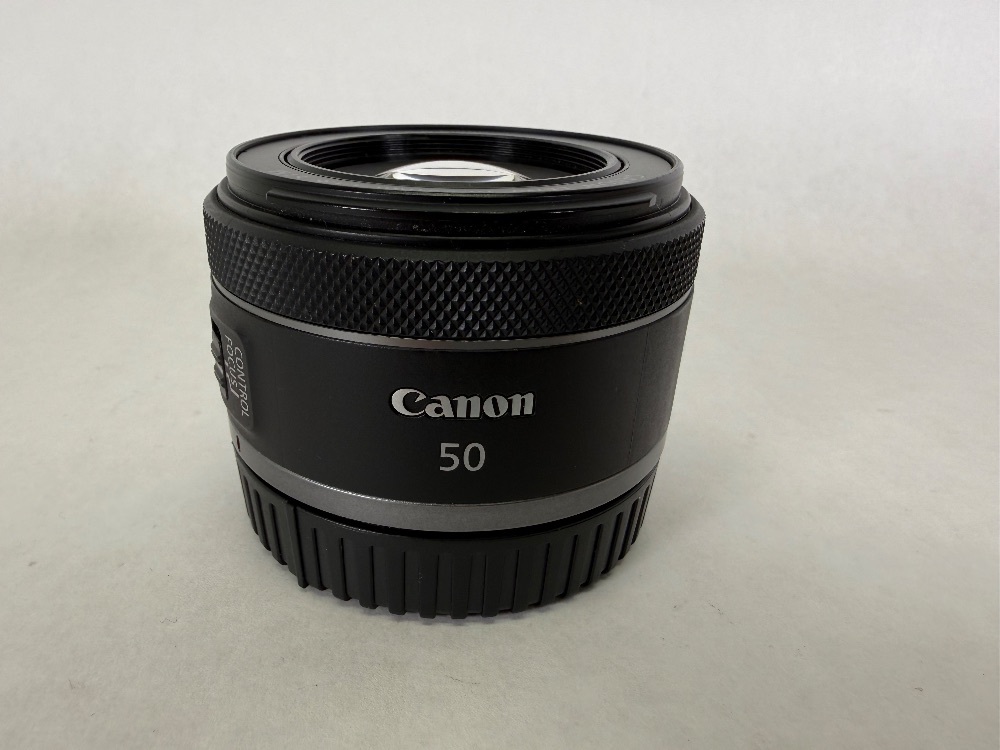
The lens is compatible with Canon EOS R-series mirrorless cameras that use the RF mount. This includes full-frame EOS R models and RF-S cameras with APS-C sensors.
It does not directly mount on:
- Canon EOS Rebel DSLR cameras
- Canon EOS 5D, 6D, or 7D cameras
- Canon EF-mount mirrorless cameras
- Canon EF-S DSLR cameras
- Nikon, Sony, Fujifilm, or Micro Four Thirds cameras
The RF mount is physically different from Canon’s EF mount. An EF-to-RF adapter allows many EF and EF-S lenses to work on EOS R cameras, but an RF lens cannot be adapted for normal use on an EF DSLR body.
Always confirm the mount before buying. “Canon 50mm lens” can refer to several different products, including the EF 50mm f/1.8 STM, which is a different lens.

Who Should Buy This Lens?
The Canon RF50mm F1.8 STM is a sensible choice for an EOS R owner who wants a small, bright prime lens at a lower cost than many professional RF lenses.
It fits photographers who want:
- Better low-light ability than a basic kit zoom
- Background blur for portraits
- A light lens for travel
- A simple lens for learning composition
- A standard lens for full-frame photography
- An 80mm-equivalent portrait option on an APS-C RF-S body
It may not fit photographers who need:
- A wide view for architecture or small rooms
- Optical image stabilization in the lens
- Weather-sealed professional construction
- A macro lens for close-up work
- A long lens for wildlife or sports
- One lens that covers many focal lengths
The best reason to choose it is not the word “prime.” It is the combination of a small body, f/1.8 aperture, and useful focal length.

Canon RF50mm F1.8 STM vs. a Kit Zoom
A kit zoom is more flexible because it covers several focal lengths. For example, a standard zoom can often move from a wide view for rooms to a short telephoto view for portraits.
The RF50mm F1.8 STM offers a brighter aperture and a smaller design. It may also create more background blur than a typical kit zoom at the same framing.
| Need | RF50mm F1.8 STM | Standard kit zoom |
|---|---|---|
| Change framing without moving | Limited | Strong |
| Low-light aperture | Strong at f/1.8 | Often narrower |
| Background separation | Often stronger | Varies |
| Portability | Very good | Usually larger |
| Wide indoor scenes | Limited | Usually better |
| Learning composition | Encourages movement | Offers framing flexibility |
A practical two-lens setup can work well: use the kit zoom for wide scenes and travel, then use the 50mm prime for portraits and dim indoor settings.
How to Use the Lens Effectively
Start by setting the camera to aperture priority mode. Choose f/1.8 when light is low or when you want strong background blur. Choose f/2.8 to f/4 when you want more of a person or object to remain sharp.
For portraits, place the subject several feet away from the background. Focus on the nearest eye and check the image at full size. If the background is too clear, increase the distance between the subject and the background rather than relying only on a wider aperture.
For street and travel photography, f/4 to f/8 can provide more depth of field. For food and detail photos, move close to the subject but remember that the lens is not a true macro lens.
For indoor scenes, raise the shutter speed before raising ISO if people are moving. A bright aperture helps, but it cannot replace a fast shutter speed.

Common Problems and Fixes
The image looks blurry
Possible causes include camera shake, subject movement, missed focus, or a shutter speed that is too slow.
Try a faster shutter speed, confirm the focus point, and take several frames. If the camera has image stabilization, verify that the feature is enabled according to the camera manual.
The background is not blurred
A wide aperture alone may not create strong blur. Move the subject farther from the background, move closer to the subject, or use a larger sensor camera. A flat scene with a nearby background will show less blur.
Autofocus hunts
Low light, low contrast, reflective surfaces, and a subject outside the focus area can cause hunting. Add light, place the focus point on a clear edge, or use manual focus.
The lens feels too narrow indoors
This is common with a 50mm lens, especially on an APS-C RF-S camera. Step back if possible. If the room does not allow it, choose a wider lens such as a 24mm or 35mm option.
Video sound includes focus noise
Use an external microphone, reduce the need for focus changes, or switch to manual focus after setting the focus point.

Frequently Asked Questions
Is the Canon RF50mm F1.8 STM good for portraits?
Yes. On a full-frame camera, it provides a natural portrait view. On an APS-C RF-S camera, its 80mm-equivalent view is even more suited to head-and-shoulder portraits. For very tight headshots, a longer lens may provide more working distance.
Can I use this lens on a Canon Rebel DSLR?
No. The RF50mm F1.8 STM is an RF-mount lens for EOS R-series mirrorless cameras. Canon Rebel DSLR cameras generally use EF or EF-S mounts.
Does the Canon RF50mm F1.8 STM have image stabilization?
No. The lens does not include optical image stabilization. A compatible EOS R camera may provide in-body stabilization, but body stabilization does not eliminate subject movement.
Is the lens good for low-light photography?
It can be useful in low light because its maximum aperture is f/1.8. You still need a suitable shutter speed, and moving subjects may require a higher ISO or additional light.
Can I use filters with the lens?
Yes. The lens accepts filters with a 43mm diameter. Use the correct filter size and avoid forcing a filter onto the front thread.
Is it a macro lens?
No. It can focus relatively close, but its maximum magnification is about 0.21x. A dedicated macro lens is better for insects, small products, and highly detailed close-ups.
Final Recommendation
The Canon RF50mm F1.8 STM is a compact, bright, and useful prime lens for Canon EOS R cameras in the United States. It is especially well suited to portraits, family photos, street photography, travel, and low-light scenes where a kit zoom feels too slow.
Choose it if you value a wide f/1.8 aperture and a lightweight design. Choose a wider lens if you often photograph small rooms or groups. Choose a stabilized or longer lens if your main work involves handheld video, distant subjects, or action.
Before buying, confirm that your camera uses the RF mount, decide whether the 50mm field of view suits your sensor size, and account for the lack of optical stabilization.

