
Introduction
For photographers in the United States, the Andoer 18-piece step-up and step-down lens filter adapter set is designed to help one filter size fit lenses with different front-thread sizes. The listed sizes are 37 mm, 49 mm, 52 mm, 55 mm, and 58 mm.
The set is useful when you own several lenses but do not want to buy a separate filter for each lens. However, it is not a lens filter by itself. It is an adapter-ring kit, and the exact ring combination may vary by seller or production batch. Check the package list before buying.

What the Andoer Lens Adapter Set Does
The Andoer kit connects a camera lens with one filter-thread size to a filter with another size. It uses two basic types of rings:
- Step-up ring: Connects a smaller lens thread to a larger filter.
- Step-down ring: Connects a larger lens thread to a smaller filter.
For example, a 49 mm to 58 mm step-up ring lets you use a 58 mm filter on a 49 mm lens. A 58 mm to 52 mm step-down ring lets you attach a 52 mm filter to a 58 mm lens.
The number printed first normally refers to the lens side, while the second number refers to the filter side. Always confirm the markings on the ring because seller descriptions may use different wording.
What the listed sizes mean
The five sizes in the product name refer to filter threads, not focal lengths:
| Size | Typical role |
|---|---|
| 37 mm | Small compact, bridge, or specialty lens thread |
| 49 mm | Common on compact mirrorless and older lenses |
| 52 mm | Common on many standard and vintage lenses |
| 55 mm | Used on various zoom and older lenses |
| 58 mm | Common on many DSLR and mirrorless kit lenses |
A lens may use a different size from the camera body or lens mount. The size you need is printed near the front of the lens, often beside the Ø symbol, such as Ø52 or Ø58.
What is included?
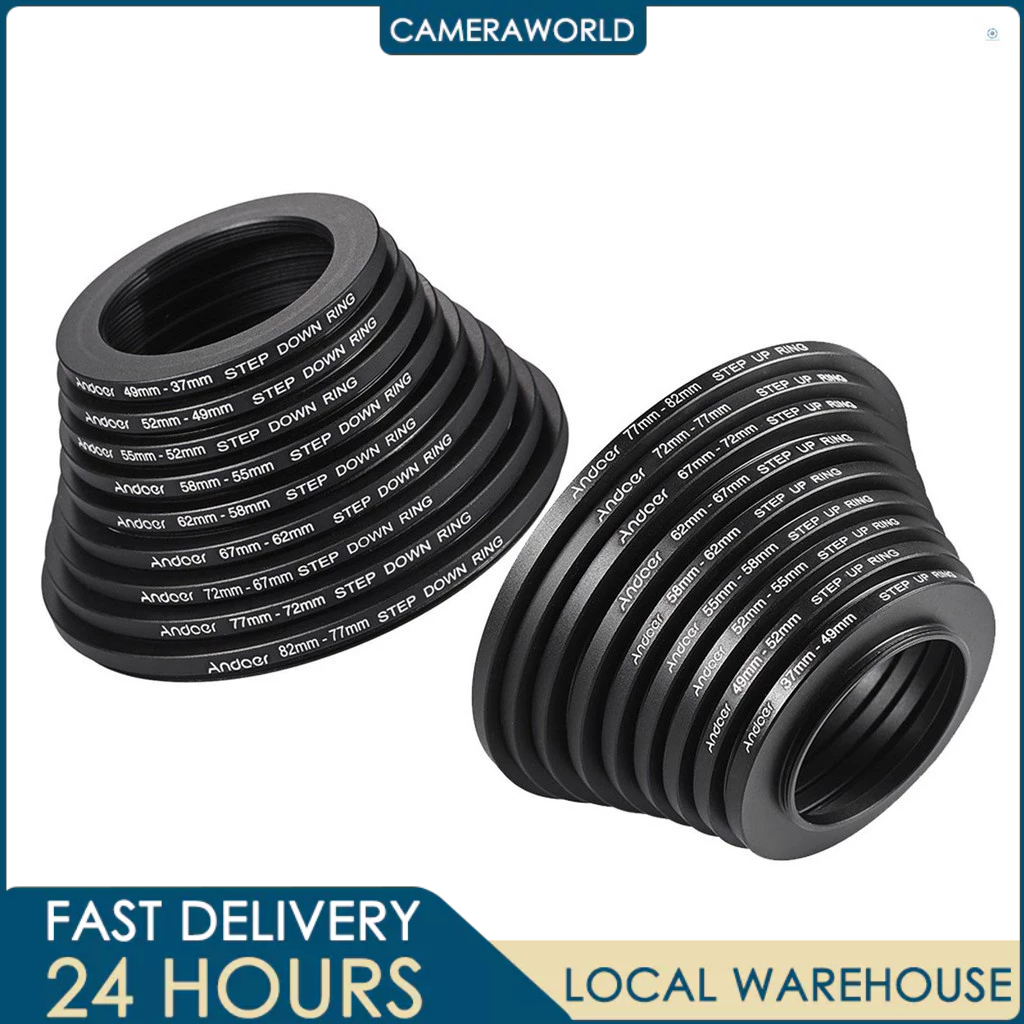
The product title identifies an 18-piece kit, but online listings can differ in how they count rings. Some sellers may list each adapter separately, while others may group similar pieces or change the package contents.
Before purchase, confirm:
- The full ring list.
- The direction of each adapter.
- Whether caps or storage cases are included.
- Whether the rings are made from aluminum, plastic, or another material.
- Whether the listing is for adapters only or includes actual filters.
Do not assume that an 18-piece set contains every possible connection between the five listed sizes. Five sizes would allow many different combinations, and an 18-piece kit may omit some directions.

Step-Up Rings Versus Step-Down Rings
A step-up ring is usually the safer and more flexible choice. It lets you use a larger filter on a smaller lens, and larger filters often cover the lens opening with less risk of dark corners.
A step-down ring can work, but it may block part of the image. This is called vignetting. Vignetting appears as dark corners or dark edges in a photograph.
Step-up ring example
suppose you own:
- A lens with a 52 mm front thread.
- A circular polarizer with a 58 mm thread.
A 52–58 mm step-up ring allows the 58 mm polarizer to fit the 52 mm lens.
This approach can reduce the need to buy multiple filters. It is often practical for photographers who use one high-quality filter across several lenses.
Step-down ring example
Suppose you own:
- A lens with a 58 mm front thread.
- A 52 mm neutral-density filter.
A 58–52 mm step-down ring may attach the filter to the lens. However, the smaller filter can become visible at the edges of the frame, especially with:
- Wide-angle lenses.
- Full-frame cameras.
- Thick filter frames.
- Stacked filters.
- Lens hoods that do not fit correctly.
If dark corners appear, remove the step-down ring or use a larger filter with a step-up ring.
Simple compatibility table
| Lens thread | Filter thread | Adapter type | Main concern |
|---|---|---|---|
| 37 mm | 49 mm | Step-up | Usually lower vignetting risk |
| 49 mm | 52 mm | Step-up | Usually practical |
| 52 mm | 58 mm | Step-up | Good for sharing larger filters |
| 58 mm | 52 mm | Step-down | Check carefully for vignetting |
| 55 mm | 49 mm | Step-down | May work on narrow lenses; test the corners |
The wider the lens view, the more carefully you should check the image. A ring that works on a normal lens may cause dark corners on an ultra-wide lens.

How to Use the Andoer Adapter Rings
Use the correct thread size, keep the threads clean, and avoid forcing the ring. Cross-threading can damage both the adapter and the lens.
Step 1: Check the lens thread
Look at the front of the lens for a marking such as:
- Ø37
- Ø49
- Ø52
- Ø55
- Ø58
The number is the lens filter-thread diameter in millimeters.
Do not use the lens mount size. The mount is the part that connects to the camera body. The filter thread is on the front of the lens.
Step 2: Check the filter size
Read the size printed on the filter rim. It should match the second side of the adapter.
For example:
- Lens: 49 mm
- Filter: 58 mm
- Required adapter: 49–58 mm step-up ring
Step 3: Inspect the threads
Remove dust, sand, or grit from the lens, ring, and filter. Small particles can make the threads bind.
Start the ring by hand. It should turn smoothly for at least a few rotations. If it stops quickly, remove it and check the size and alignment.
Step 4: Attach the ring
Hold the lens and ring straight. Turn the ring gently in the normal tightening direction.
Do not use pliers or excessive force. Camera filter threads are fine and can be damaged more easily than they appear.
Step 5: Attach the filter
After the adapter is secure, attach the filter to the outer thread. Keep the filter level as you turn it.
If you need to use more than one ring, attach the rings one at a time. Test each connection before adding another part.
Step 6: Check the image
Take a photo at the widest focal length and the smallest practical aperture. Inspect the corners on the camera screen or computer.
Look for:
- Dark corners.
- Uneven sharpness.
- A loose ring.
- Filter movement.
- Reflections or flare.
- A lens hood that no longer fits.
If the result is clear and the ring remains secure, the setup is working as intended.

How to Choose the Right Adapter Combination
The best adapter depends on the lens thread, filter thread, lens angle, and filter type. The simplest rule is to move from a smaller lens thread to a larger filter whenever possible.
Use this decision method
- Write down the lens thread.
- Write down the filter thread.
- Compare the two numbers.
- Choose a step-up ring if the filter size is larger.
- Choose a step-down ring if the filter size is smaller.
- Check for vignetting before using the setup for important work.
Example: sharing one polarizing filter
You have three lenses:
- 49 mm lens
- 52 mm lens
- 55 mm lens
You own one 58 mm circular polarizer. The most flexible approach is to use:
- 49–58 mm step-up ring
- 52–58 mm step-up ring
- 55–58 mm step-up ring
This lets the same 58 mm filter move between the lenses. The larger filter does not automatically improve image quality, but it may reduce the number of filters you need to purchase.
Example: using a 58 mm filter on a 37 mm lens
A 37–58 mm step-up ring may be mechanically suitable if that exact adapter is included. Yet the long size jump can place the filter farther from the lens and may affect the use of a lens hood.
Check the full view for shading. Also confirm that the filter does not interfere with a moving front lens element.
When a step-down ring makes sense
A step-down ring may be acceptable when:
- The lens is not very wide.
- The filter is thin.
- The image has already been tested.
- You do not need a lens hood.
- The smaller filter fully covers the lens’s angle of view.
For wide-angle work, a larger filter and step-up ring are usually the more dependable choice.
Benefits and Limitations of the 18-Piece Kit
The main benefit is flexibility. A multi-size ring kit can help photographers share filters across several lenses instead of buying duplicate filters.
Potential benefits
- Supports several listed filter sizes.
- Helps reduce duplicate filter purchases.
- Useful for travel and backup gear.
- Can connect older lenses to newer filter sizes.
- Makes it easier to build a filter system around one larger size.
Important limitations
The rings do not change the optical properties of a filter. A step-up ring cannot turn a clear filter into a polarizer, neutral-density filter, or UV filter.
The kit also cannot solve every compatibility problem. Mechanical fit does not guarantee optical clearance, no-vignetting performance, or compatibility with a lens hood.
Other limitations may include:
- Missing size combinations.
- Tight or loose threads.
- Stacking that increases the risk of vignetting.
- Filter reflections caused by extra surfaces.
- Difficulty removing rings after overtightening.
- A step-down ring blocking the image at wide focal lengths.
The product should therefore be viewed as a connection system, not as a complete filter solution.

Common Problems and Troubleshooting
Most problems come from using the wrong direction, forcing the threads, or overlooking the lens’s field of view.
The adapter will not screw onto the lens
Possible causes include:
- The lens and ring have the same size.
- The ring is facing the wrong way.
- The threads are misaligned.
- Dirt or grit is present.
- The product uses a different size than expected.
Remove the ring and compare the markings. Start again with the ring held straight. If it still does not fit, do not force it.
The filter is stuck
Filters can bind when they are overtightened. Hold the ring rather than the lens barrel and turn the filter gently.
A rubber jar opener may improve grip. Avoid metal tools, pliers, and sudden force. If the ring is attached to an expensive lens and cannot be removed, a camera repair shop can help reduce the risk of damage.
Dark corners appear in photos
This usually indicates vignetting. The most likely causes are:
- A step-down ring.
- A thick filter frame.
- Multiple stacked rings.
- A wide-angle focal length.
- A lens hood extending into the frame.
Remove the hood and test again. Then remove stacked rings one at a time. If the corners remain dark, use a larger filter with a step-up ring.
Autofocus or exposure seems different
The adapter ring itself normally does not carry electronic contacts. It should not change autofocus communication or exposure data between the camera and lens.
However, a filter may change the amount or color of light entering the lens. A polarizer can reduce light, and a strong neutral-density filter can require a longer exposure or higher ISO.
The lens cap or hood no longer fits
An adapter changes the front diameter and may add length. The original cap or hood may not fit the new outer thread.
Use a cap that matches the final outer diameter. For a hood, check the manufacturer’s fit guidance and test for vignetting.

Maintenance and Safe Storage
Keep the rings dry and free of grit. A small amount of dust usually does not affect the image, but grit inside the threads can cause binding or damage.
For routine care:
- Brush or blow away loose dust.
- Wipe the rings with a clean, dry microfiber cloth.
- Store them in a pouch or divided case.
- Avoid leaving rings connected tightly for long periods.
- Mark frequently used rings if the size numbers are difficult to read.
- Keep metal rings away from loose sand during outdoor shoots.
Do not use household oil on camera filter threads. Oil can spread to glass surfaces and attract dust.
When removing a ring, turn the adapter rather than twisting the lens barrel. Hold the lens by a solid part of its body, not by a focus or zoom ring.

Is the Andoer 18-Piece Set Worth Buying?
The set can make sense for photographers who own lenses with the listed 37 mm, 49 mm, 52 mm, 55 mm, or 58 mm threads and want to share filters.
It is less suitable if you need:
- A single exact adapter only.
- Guaranteed wide-angle coverage.
- A premium filter system with verified tolerances.
- A complete set of every possible size direction.
- Built-in electronic communication.
Before ordering, compare the exact contents with your lens and filter sizes. The most useful purchase is not always the set with the most pieces. It is the set that includes the specific connections you will use.
For most systems, choose one larger common filter size and use step-up rings from smaller lenses. This approach is usually easier to manage than buying many smaller filters and relying on step-down rings.

Frequently Asked Questions
Does the Andoer set include actual camera filters?
Not necessarily. The product name describes step-up and step-down lens filter adapters. Confirm the listing before purchase because an adapter-ring kit and a filter kit are different products.
Can I use a 58 mm filter on a 37 mm lens?
Only if the kit includes the correct 37–58 mm step-up connection, either as one ring or as a compatible combination. After installation, test the widest focal length for vignetting.
Are step-up rings better than step-down rings?
Step-up rings are generally more flexible because they let a smaller lens use a larger filter. Step-down rings can work, but they have a higher risk of dark corners, especially on wide-angle lenses.
Will the adapter affect image quality?
The ring does not add optical glass, so it does not directly change the filter’s optical effect. However, poor alignment, reflections, a thick ring, or vignetting can affect the final image.
Can I stack several adapter rings?
You can, if the threads match, but stacking increases the distance from the lens and may cause vignetting. It can also make the assembly harder to remove. Use the fewest rings needed.
How do I find my lens filter size?
Look for a diameter mark near the front of the lens. It usually appears as a number after the Ø symbol, such as Ø52 or Ø58. If the mark is missing, consult the lens manual or the manufacturer’s specifications.
Conclusion
The Andoer 18-piece step-up and step-down lens filter adapter set is a practical way to connect filters across several lens-thread sizes. Its value depends on the exact rings included, the filters you already own, and the focal lengths you use.
Use step-up rings when possible, check the package contents before ordering, and test every setup for vignetting. If a ring does not fit smoothly, stop rather than forcing it. That simple habit protects both the adapter and the lens.

